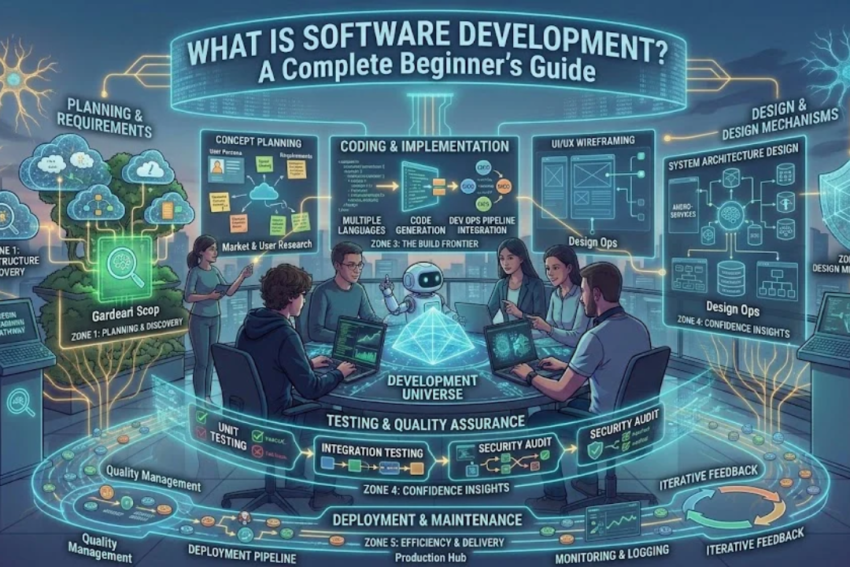
Meta Title: What Is Software Development? A Complete Beginner’s Guide (2026)
Meta Description: Learn what software development is, how it works, its types, popular programming languages, essential tools, career opportunities, and how beginners can get started in 2026.
Focus Keyword: Software Development
Secondary Keywords: Software development process, software development life cycle, programming languages, software developer career, software development tools, web development, mobile app development.
Introduction
Software development has become one of the most important parts of modern technology. From mobile applications and websites to banking systems, online shopping platforms, healthcare software, and artificial intelligence tools, software powers many of the services people use every day.
As businesses continue to adopt digital technologies, the demand for skilled software developers remains significant across numerous industries. This creates exciting opportunities for students, beginners, professionals, and anyone interested in building a career in technology.
But what exactly is software development? How does it work? Which programming languages should beginners learn, and what skills are required to become a software developer?
In this complete beginner’s guide, we will explain software development in simple terms, explore its major types, discuss the tools developers use, and provide a practical roadmap for getting started.
Whether you want to build your own application, start freelancing, or pursue a professional career in IT, understanding software development is an excellent first step.
What Is Software Development?
Software development is the process of designing, creating, testing, deploying, and maintaining computer programs and applications. It involves identifying a problem, planning a solution, writing instructions that computers can execute, and ensuring that the resulting software works correctly.
Software can be as simple as a calculator application or as complex as a hospital management system used by thousands of healthcare professionals.
Developers use programming languages, frameworks, libraries, databases, and other technical tools to transform ideas into functional digital products.
For example, consider a food delivery application. Its software may allow customers to browse restaurants, place orders, make payments, and track deliveries. Behind these features are developers who build the user interface, manage databases, connect payment services, and implement the application’s business logic.
Software development is therefore more than writing code. It combines problem-solving, logical thinking, design, collaboration, testing, and continuous improvement.
What Is Software?
Software is a collection of programs, instructions, and related data that tells a computer or digital device what to do.
Unlike hardware, which consists of physical components such as processors, keyboards, and storage devices, software operates through digital instructions.
Common examples include:
- Operating systems: Windows, Linux, macOS, and Android.
- Web applications: Online banking platforms, email services, and project management tools.
- Mobile applications: Messaging apps, fitness trackers, and navigation apps.
- Business software: Accounting systems, inventory management tools, and customer relationship management platforms.
- Entertainment software: Video games, streaming platforms, and music applications.
Each type of software serves a different purpose, but all depend on instructions that computers can execute.
Why Is Software Development Important?
Software development supports innovation and helps individuals and organizations solve practical problems.
1. Business Automation
Businesses use software to automate repetitive tasks, manage information, generate reports, and reduce manual errors. For example, an inventory system can automatically update stock levels when products are sold.
2. Better Communication
Messaging applications, video conferencing platforms, and collaboration tools allow people to communicate across different countries and time zones.
3. Improved Healthcare
Hospitals, laboratories, and clinics use software to manage appointments, laboratory results, patient records, billing, and medical equipment. Well-designed systems can improve efficiency and help healthcare professionals access information when they need it.
4. Education and Learning
Learning management systems, online courses, digital classrooms, and educational applications make learning resources accessible to students around the world.
5. Innovation and Artificial Intelligence
Software development provides the foundation for artificial intelligence, machine learning, robotics, cloud computing, and data analysis. These technologies depend on software to process information and perform useful tasks.
6. Digital Business Opportunities
Entrepreneurs can use software to launch online stores, subscription services, mobile applications, and other digital products. Developers can also work remotely or offer freelance services to clients.
Types of Software Development
Software development includes several specialized fields. Understanding these areas can help beginners choose a direction based on their interests and career goals.
1. Web Development
Web development involves creating websites and web applications that users access through internet browsers.
Examples include online stores, news websites, booking systems, educational portals, and social networking platforms.
Web development has three common areas:
- Frontend development: Building the parts of a website users see and interact with.
- Backend development: Managing server-side operations, databases, authentication, and application logic.
- Full-stack development: Working across both frontend and backend systems.
Popular technologies include HTML, CSS, JavaScript, React, Node.js, Python, and various database systems.
Web development is often a practical starting point because beginners can build visible projects and gradually expand their skills.
2. Mobile App Development
Mobile app development focuses on applications designed for smartphones and tablets.
Developers create apps for Android, iOS, or both platforms using native or cross-platform technologies.
Examples include mobile banking apps, fitness applications, messaging tools, and online shopping apps.
Common technologies include Kotlin for Android, Swift for iOS, and cross-platform frameworks such as Flutter and React Native.
Mobile developers need to understand user interface design, device compatibility, application performance, security, and app deployment.
3. Desktop Software Development
Desktop software development involves building programs that run directly on computers and laptops.
Examples include image editors, accounting applications, office software, engineering tools, and desktop inventory systems.
Popular technologies include C#, Java, C++, and Python, depending on the application and operating system.
Desktop software can be useful when applications require extensive computing resources, specialized interfaces, or access to local hardware and files.
4. Game Development
Game development combines programming, design, animation, sound, and interactive storytelling to create video games.
Game developers work on gameplay mechanics, character movement, artificial intelligence, physics, graphics, and multiplayer features.
Popular game development tools include Unity and Unreal Engine.
This field can be attractive to people who enjoy gaming, creative problem-solving, and interactive experiences. However, professional game development can require specialized skills in mathematics, graphics, optimization, and teamwork.
5. Enterprise Software Development
Enterprise software is designed to support the operations of large organizations.
Examples include enterprise resource planning systems, customer relationship management platforms, supply chain systems, and human resource management applications.
These systems often involve complex databases, user permissions, integrations, reporting, and security requirements.
Developers in this area may work with Java, C#, SQL, cloud platforms, and enterprise frameworks.
6. Embedded Software Development
Embedded software controls the operation of electronic devices and specialized hardware.
It is used in automobiles, medical equipment, industrial machines, smart home devices, and Internet of Things products.
Embedded developers may work with C, C++, microcontrollers, hardware interfaces, and real-time operating systems.
This field is particularly suitable for people interested in electronics, robotics, and the interaction between hardware and software.
7. Artificial Intelligence and Machine Learning Development
AI and machine learning development involves creating systems that identify patterns, make predictions, process language, or generate content using computational models.
Examples include recommendation systems, fraud detection tools, image recognition applications, and intelligent virtual assistants.
Python is widely used in this field because of its extensive ecosystem of data science and machine learning libraries.
AI development often requires additional knowledge of statistics, mathematics, data processing, model evaluation, and responsible AI practices.
The Software Development Life Cycle (SDLC)
The Software Development Life Cycle, commonly known as SDLC, is a structured approach to building and maintaining software.
Although teams may use different methods, the process commonly includes the following stages.
Step 1: Requirement Analysis
The first stage is understanding the problem the software must solve.
Developers, clients, users, and other stakeholders identify the required features, performance expectations, security needs, and project limitations.
For example, before developing a hospital appointment system, a team might identify requirements for patient registration, doctor schedules, appointment booking, reminders, and access permissions.
Clear requirements help prevent misunderstandings later in the project.
Step 2: Planning
During planning, the team estimates the project scope, time, budget, resources, and potential risks.
The team also decides which technologies and development methods are appropriate.
A well-prepared plan helps developers organize their work and prioritize the most important features.
Step 3: Software Design
In this stage, developers and designers determine how the software will be structured.
Design decisions may include the user interface, database organization, application architecture, security controls, and communication between system components.
Wireframes, diagrams, prototypes, and technical specifications may be created before implementation begins.
Step 4: Coding and Implementation
Coding is the stage where developers write the instructions that make the application function.
They use programming languages and development tools to implement features, connect databases, and integrate external services.
Developers generally divide larger applications into smaller components so that the code is easier to understand, test, and maintain.
Step 5: Software Testing
Testing helps identify defects, security weaknesses, performance problems, and unexpected behavior before the software reaches users.
Common testing methods include:
- Unit testing: Checking individual functions or components.
- Integration testing: Verifying that different components work together.
- System testing: Evaluating the complete application.
- Acceptance testing: Checking whether the software meets user and business requirements.
- Security testing: Looking for vulnerabilities that could expose systems or information.
Testing is not simply a final step. Many development teams test continuously throughout the project.
Step 6: Deployment
Deployment means making software available for its intended users.
A website may be deployed to a web server or cloud platform, while a mobile application may be distributed through an app store.
Before deployment, teams may configure servers, databases, access permissions, monitoring systems, and backup procedures.
Step 7: Maintenance and Updates
Software development does not end when an application is released.
Developers monitor performance, fix bugs, respond to user feedback, address security issues, and introduce new features.
Regular maintenance helps keep software reliable, secure, and compatible with changing technologies.
Understanding the SDLC at a Glance
| Stage | Main purpose |
|---|---|
| Requirements | Understand what users need |
| Planning | Define scope, resources, and schedule |
| Design | Plan architecture and user experience |
| Development | Write and integrate code |
| Testing | Identify defects and verify functionality |
| Deployment | Release the software |
| Maintenance | Fix issues and improve the product |
Different software development approaches organize these stages differently. Agile teams, for example, often repeat planning, development, and testing in short cycles instead of completing every stage just once.
Popular Programming Languages for Software Development
Programming languages allow developers to communicate instructions to computers. The right language depends on the type of application, the development environment, and the project’s requirements.
Python
Python is known for its readable syntax and broad range of applications.
It is used in automation, web development, data analysis, artificial intelligence, scientific computing, and scripting.
Beginners often choose Python because its syntax allows them to focus on programming concepts before dealing with more complex language features.
JavaScript
JavaScript is a fundamental technology for interactive websites and is also used for server-side development.
Developers can use it with frameworks and libraries such as React and Node.js-related tools to build modern web applications.
It is a strong option for beginners interested in website development.
Java
Java is widely used in enterprise applications, backend systems, and various large-scale software environments.
It supports object-oriented programming and offers a mature ecosystem of libraries and development tools.
C and C++
C is important in systems programming, embedded development, and performance-sensitive applications.
C++ is used in game engines, high-performance software, desktop applications, and other areas where detailed control over system resources can be valuable.
These languages can require more effort to learn than some beginner-oriented alternatives, but they provide a deeper understanding of how software interacts with computer hardware.
C#
C# is commonly used for applications built within the .NET ecosystem, including enterprise systems, desktop software, web applications, and games developed with Unity.
It can be a good choice for learners interested in Microsoft technologies or structured application development.
SQL
SQL, or Structured Query Language, is used to retrieve, organize, and manipulate data in relational databases.
It is essential for many developers who work with user accounts, transactions, reporting systems, inventory applications, and business data.
SQL complements programming languages rather than replacing general-purpose programming.
Beginner tip: You do not need to learn every programming language at once. Choose one based on your goal, learn the fundamentals, and build small projects before expanding your technology stack.
Essential Software Development Tools
Professional developers use tools to write code, manage projects, test applications, and collaborate with teammates.
1. Visual Studio Code
Visual Studio Code is a popular code editor that supports many programming languages through extensions. It offers features such as syntax highlighting, debugging support, and integrated terminal access.
2. Git
Git is a version control system that records changes to source code. It allows developers to review previous versions, work on separate branches, and combine changes from different contributors.
3. GitHub
GitHub is a platform for hosting Git repositories and collaborating on software projects. Developers use it to share code, review changes, manage issues, and maintain project documentation.
4. Integrated Development Environments
An Integrated Development Environment (IDE) combines several development tools into one application.
Examples include Visual Studio, IntelliJ IDEA, and PyCharm. Depending on the product, an IDE may provide code completion, debugging, testing, and project management features.
5. Database Management Tools
Database tools help developers create, query, monitor, and manage databases.
Examples include PostgreSQL tools, MySQL Workbench, and database management features built into other development environments.
6. Testing and Automation Tools
Testing frameworks help developers check whether their software behaves as expected. Automation tools can run tests, build applications, and support deployment workflows whenever code changes.
The specific tools vary by programming language, team, and project.
Skills Required to Become a Software Developer
Successful software developers need a combination of technical and interpersonal skills.
Technical Skills
Programming fundamentals: Understand variables, data types, conditions, loops, functions, and error handling.
Data structures and algorithms: Learn how information can be organized and processed efficiently.
Problem-solving: Break complicated problems into smaller, manageable tasks.
Database knowledge: Understand how to store, retrieve, and update information.
Debugging: Identify the causes of errors and develop reliable solutions.
Version control: Use Git and platforms such as GitHub to manage code changes.
Testing: Verify that applications behave correctly and handle unexpected situations.
Security awareness: Understand secure coding practices, authentication, permissions, and the protection of sensitive information.
Soft Skills
Technical knowledge alone is not enough for every software development role.
Developers also benefit from:
- Communication and teamwork.
- Time management and organization.
- Critical thinking.
- Adaptability and willingness to learn.
- Attention to detail.
- Clear technical documentation.
Many projects involve working with designers, business analysts, customers, testers, and other developers. Strong communication helps these teams build software that meets real user needs.
How to Become a Software Developer: A Step-by-Step Roadmap
If you are new to programming, you do not need an advanced degree or expensive equipment to begin learning. A computer, internet access, consistent practice, and a structured learning plan can provide a starting point.
Step 1: Choose Your Development Path
Start by identifying what you want to build.
- Interested in websites? Begin with HTML, CSS, and JavaScript.
- Interested in automation or data analysis? Consider Python.
- Interested in Android apps? Explore Kotlin or a cross-platform framework.
- Interested in games? Learn programming fundamentals and explore Unity or Unreal Engine.
- Interested in electronic devices? Explore C, C++, and embedded systems.
You can change direction later as you discover what interests you most.
Step 2: Learn the Fundamentals
Focus on understanding programming concepts rather than memorizing code.
Learn variables, data types, loops, functions, conditional statements, basic data structures, and error handling.
Practice by solving small problems, such as calculating averages, converting units, or organizing a list of records.
Step 3: Build Small Projects
Practical projects help turn theoretical knowledge into usable skills.
Begin with simple applications such as:
- A calculator.
- A personal portfolio website.
- A to-do list application.
- A basic expense tracker.
- A student record management system.
- A weather application using an API.
Complete projects one at a time. Start with a working version, then improve its design, reliability, and functionality.
Step 4: Learn Git and GitHub
Use Git to track changes and GitHub to host selected projects.
Write clear project descriptions and include a README file explaining the application’s purpose, technologies, installation steps, and features.
A well-organized portfolio makes it easier for potential employers or clients to understand your work.
Step 5: Study Data Structures, Databases, and Testing
As your projects become more advanced, learn how to organize data, connect applications to databases, test functionality, and debug errors.
The depth required will depend on your chosen field, but these skills provide a strong foundation for many development roles.
Step 6: Create a Portfolio
A portfolio demonstrates what you can build rather than simply listing what you have studied.
Aim to develop several completed projects that show different skills. For example, a web developer might create a responsive website, a database-driven application, and an application that uses an external API.
Describe your contribution honestly and explain the problems you solved.
Step 7: Apply for Entry-Level Opportunities
When you have a solid foundation and relevant projects, explore internships, junior developer positions, trainee programs, and freelance opportunities.
Read job descriptions to identify the skills employers expect. Use that information to guide your learning without trying to master every technology at once.
Prepare to explain your projects, demonstrate your problem-solving approach, and discuss how you handle mistakes and feedback.
Step 8: Keep Learning
Software technologies change, and developers regularly need to learn new tools, frameworks, and practices.
However, strong fundamentals remain valuable. Focus on understanding core concepts, reading documentation, evaluating new technologies, and adapting to changing project requirements.
How Long Does It Take to Learn Software Development?
The time required depends on your starting knowledge, learning schedule, chosen specialization, and the complexity of the skills you want to develop.
As a general planning estimate, a beginner studying consistently for several hours each week might use the following timeline:
| Learning period | Possible milestone |
|---|---|
| Months 1–2 | Learn programming fundamentals |
| Months 3–4 | Build small projects |
| Months 5–6 | Learn relevant tools and intermediate concepts |
| Months 6–12 | Develop a stronger portfolio and prepare for suitable entry-level opportunities |
These are illustrative milestones, not guaranteed outcomes. Some learners progress faster, while others need more time, particularly when studying alongside full-time work or education.
The most important factor is consistent practice. Completing projects and learning to solve problems independently are generally more useful than simply watching tutorials.
Career Opportunities in Software Development
Software development offers multiple career paths, depending on a person’s interests and technical strengths.
Common roles include:
- Frontend Developer: Builds website interfaces and user-facing features.
- Backend Developer: Develops server-side logic, databases, and APIs.
- Full-Stack Developer: Works across frontend and backend technologies.
- Mobile App Developer: Creates applications for smartphones and tablets.
- Software Engineer: Designs and develops software systems and solutions.
- QA Automation Engineer: Creates automated tests to evaluate software quality.
- DevOps Engineer: Helps automate software delivery and manage infrastructure.
- Game Developer: Builds interactive games and related systems.
- Data Engineer: Develops systems for collecting, processing, and storing data.
- AI/ML Engineer: Builds and integrates machine learning solutions.
Software developers work in industries such as finance, healthcare, education, retail, manufacturing, telecommunications, and entertainment.
Employment opportunities and salaries vary by location, experience, specialization, employer, and market conditions. Beginners should focus on developing demonstrable skills and researching the requirements of the roles they want.
Is Software Development a Good Career in 2026?
Software development can be a rewarding career for people who enjoy solving problems, learning continuously, and building digital products.
Organizations rely on software to manage operations, deliver services, analyze information, and improve customer experiences. At the same time, AI-assisted coding tools are changing how developers write and review code.
These tools can help with routine tasks, explanations, and initial code drafts, but they do not eliminate the need to understand requirements, evaluate solutions, test functionality, protect data, and maintain software.
For beginners, this means learning how to use modern tools responsibly while developing strong programming fundamentals and independent problem-solving skills.
A successful developer is not simply someone who can produce code quickly. It is someone who can create reliable, maintainable, secure software that addresses a genuine need.
Common Challenges in Learning Software Development
Learning to code can be challenging, particularly during the first few months. Understanding common obstacles can help beginners develop realistic expectations.
Getting Stuck on Errors
Errors are a normal part of programming. Learn to read error messages, isolate the problem, reproduce the issue, and test possible solutions instead of randomly changing code.
Trying to Learn Too Many Languages
Switching between multiple languages and frameworks can make progress slower. Focus on one main learning path until you can build useful projects.
Relying Too Much on Tutorials
Tutorials can introduce new concepts, but watching them without practicing may limit your understanding. After completing a lesson, try recreating the project independently or adding a feature of your own.
Losing Motivation
Large projects can feel overwhelming. Divide them into smaller tasks and celebrate measurable progress, such as completing a function, fixing a bug, or publishing a project.
Ignoring Testing and Documentation
Working code is only one part of a quality application. Test important features, document setup instructions, and consider security, accessibility, and maintainability as your skills develop.
Future Trends in Software Development
Software development continues to evolve as new technologies and practices become more widely adopted.
Artificial Intelligence-Assisted Development
AI coding assistants can help developers generate drafts, explain unfamiliar code, and identify possible errors. Developers still need to verify outputs, test changes, and protect confidential information.
Cloud Computing
Cloud platforms allow organizations to deploy applications, manage data, and scale computing resources without maintaining every part of their own physical infrastructure.
Cybersecurity-Focused Development
As applications process increasing amounts of valuable information, secure coding, identity management, vulnerability testing, and privacy protection remain important.
Low-Code and No-Code Platforms
These platforms allow users to create certain applications through visual interfaces and prebuilt components. They can simplify common tasks, although complex systems may still require custom programming and technical oversight.
Automation and DevOps
Automated testing, continuous integration, and continuous delivery help teams build, test, and release software more consistently.
Continued Growth of Data-Driven Applications
Organizations increasingly use data to support decision-making, personalization, forecasting, and operational improvements. Software developers help build the systems that make these capabilities possible.
For beginners, the best approach is to understand core programming principles first and then explore emerging technologies that align with their interests.
Frequently Asked Questions (FAQs)
1. What is software development in simple words?
Software development is the process of creating and maintaining computer programs and applications. It includes planning, coding, testing, releasing, and improving software to solve particular problems.
2. Is software development difficult for beginners?
Software development can be challenging at first, but beginners can learn it step by step. Starting with basic programming concepts, practicing regularly, and building small projects can make the process more manageable.
3. Which programming language is best for beginners?
Python is a common starting point because of its readable syntax and wide range of applications. JavaScript is a strong option for people interested in web development. The best choice depends on your goals.
4. Can I learn software development without a computer science degree?
Yes. Many people learn software development through online courses, books, practical projects, and independent study. Some employers require specific qualifications, but others place substantial emphasis on relevant experience and demonstrable skills.
5. How long does it take to become a software developer?
There is no fixed timeline. Depending on the learning schedule and target role, a beginner may need several months or longer to build the skills and portfolio required for entry-level opportunities.
6. What tools do software developers use?
Common tools include Visual Studio Code, Git, GitHub, programming language compilers or interpreters, debugging tools, testing frameworks, and database management systems. The exact toolkit depends on the project.
7. What is the difference between software development and software engineering?
The terms overlap and are sometimes used interchangeably. Software development generally emphasizes creating and maintaining software, while software engineering often highlights systematic design, testing, architecture, reliability, and the application of engineering principles. Actual responsibilities depend on the organization and job title.
8. Is software development a good career in 2026?
It can be a good career for people who enjoy technology and continuous learning. Opportunities vary by region and specialization, so aspiring developers should research current job requirements and build practical skills that match their chosen field.
9. Can software developers work remotely?
Yes. Many software development roles can be performed remotely because code, project documentation, and collaboration tools are accessible online. However, remote work availability depends on the employer, role, and location.
10. What is the best way to start learning software development?
Choose one specialization, learn its fundamentals, build small projects, practice debugging, and use version control. Gradually develop a portfolio and compare your skills with the requirements of entry-level positions.
Conclusion
Software development is the process of turning ideas and requirements into working digital solutions. It includes much more than writing code: developers must plan projects, design systems, test functionality, manage data, address security concerns, and maintain applications over time.
For beginners, the best starting point is to choose one area of interest, learn a suitable programming language, and build practical projects. Tools such as Git and GitHub can help you manage your work and demonstrate your progress to potential employers.
As you gain experience, you can explore specialized fields such as web development, mobile applications, artificial intelligence, enterprise systems, or game development.
You do not need to learn everything at once. Start with the fundamentals, practice consistently, and improve one project at a time. With patience and a willingness to keep learning, you can develop the skills needed to pursue software development as a personal interest or a professional career.
Ready to start? Choose your first programming language today, build a small project, and take the first step toward becoming a software developer.