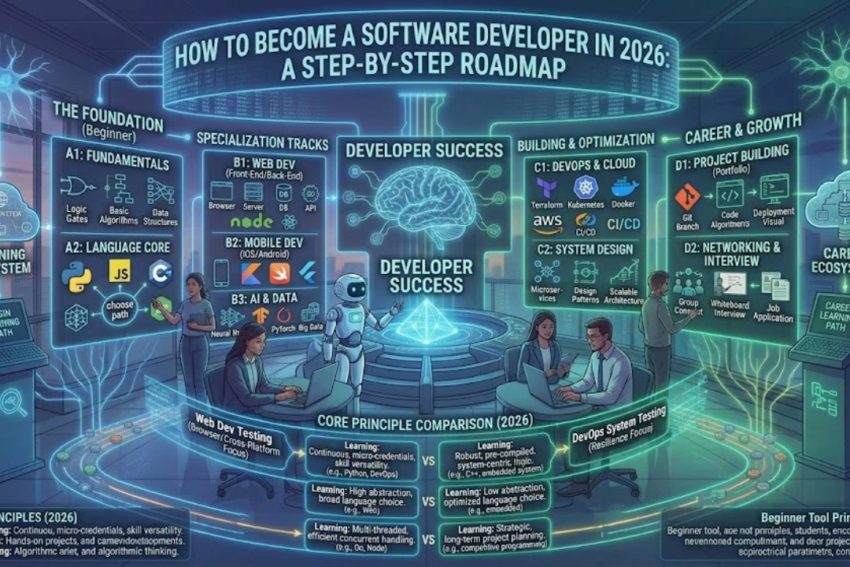
Meta Title: How to Become a Software Developer in 2026: Complete Roadmap
Meta Description: Learn how to become a software developer in 2026 with this step-by-step roadmap covering programming languages, essential skills, projects, tools, and career opportunities.
Focus Keyword: How to Become a Software Developer in 2026
Secondary Keywords: software developer roadmap, learn programming for beginners, software development skills, programming languages for beginners, software developer career, coding projects for beginners
Introduction
Software development is one of the most exciting career paths for people interested in technology, problem-solving, and building digital products. From mobile applications and websites to artificial intelligence systems and business software, developers help create the tools people use every day.
The good news is that you do not necessarily need a computer science degree to begin learning software development. With a structured learning plan, consistent practice, and practical projects, beginners can build the skills required to pursue entry-level opportunities.
However, becoming a software developer involves more than watching programming tutorials. You need to understand programming fundamentals, learn development tools, solve real problems, build a portfolio, and prepare for technical interviews.
This guide explains how to become a software developer in 2026, even if you have no previous coding experience. It covers the skills to learn, programming languages to consider, projects to build, common mistakes to avoid, and ways to prepare for your first job.
What Does a Software Developer Do?
A software developer designs, builds, tests, maintains, and improves software applications. Developers work with programming languages, databases, development environments, and other tools to turn ideas into working products.
Their responsibilities vary depending on their specialization and the organization they work for.
Common responsibilities include:
- Writing and maintaining code.
- Understanding user and business requirements.
- Designing application features.
- Testing software and fixing bugs.
- Working with databases and APIs.
- Reviewing code and collaborating with teammates.
- Improving application performance and security.
- Updating existing software as requirements change.
Software developers can work in industries such as healthcare, finance, education, e-commerce, entertainment, manufacturing, and information technology.
Step 1: Understand the Different Types of Software Development
Before learning to code, explore the main areas of software development. Choosing an initial direction helps you focus your time and avoid learning too many unrelated technologies at once.
1. Web Development
Web developers build websites and web applications. They may work on the visual interface users interact with or the server-side systems that process data.
Common technologies include HTML, CSS, JavaScript, TypeScript, and frameworks such as React.
Web development is a practical starting point because you can build projects that run in a browser and share them easily with potential employers.
2. Mobile App Development
Mobile developers create applications for smartphones and tablets.
Popular options include Kotlin for native Android development, Swift for native iOS development, and Flutter for cross-platform applications.
This path may suit you if you are interested in mobile interfaces, device features, and applications used on the move.
3. Backend Development
Backend developers build the server-side components of applications. They handle business logic, authentication, databases, APIs, and communication between systems.
Common technologies include Python, Java, JavaScript with Node.js, C#, and Go.
Backend development is a good option for people who enjoy logic, data processing, and system design.
4. Desktop Software Development
Desktop developers create software that runs on Windows, macOS, or Linux.
Examples include accounting programs, productivity applications, scientific tools, and business management systems.
Depending on the project, developers may use C#, Java, C++, Python, or other technologies.
5. AI and Machine Learning Development
AI developers create systems that use data and machine learning techniques to perform tasks such as classification, prediction, automation, and language processing.
Python is a common starting language because of its libraries and learning resources. However, this path also requires an understanding of data, mathematics, model evaluation, and responsible AI use.
Beginner tip: Start with one area. You can explore other specializations after you understand programming fundamentals.
Step 2: Learn the Fundamentals of Programming
Programming fundamentals are the foundation of software development. They help you understand how code works regardless of the language or framework you eventually choose.
Focus on these concepts first.
Variables and Data Types
Variables store information that a program uses. Data types describe the kind of information being stored, such as text, numbers, and true-or-false values.
Conditional Statements
Conditions allow a program to make decisions. For example, an application might display different messages depending on whether a user has successfully signed in.
Loops
Loops repeat instructions. They are useful for processing lists, reading records, and performing repetitive tasks without writing the same code many times.
Functions
Functions group instructions into reusable blocks. They make code easier to organize, test, and maintain.
Data Structures
Learn how lists, arrays, dictionaries, sets, stacks, queues, and other structures organize information. Start with the structures supported by your chosen language.
Algorithms and Problem-Solving
An algorithm is a sequence of steps used to solve a problem. Begin with simple problems involving calculations, searching, sorting, and manipulating text.
You do not need to master advanced algorithms immediately. Concentrate on understanding the logic behind your solutions.
Step 3: Choose Your First Programming Language
One of the most common beginner mistakes is trying to learn several programming languages simultaneously. Instead, choose one language that matches your initial goal.
Here are some popular options:
| Programming language | Suitable for | Beginner consideration |
|---|---|---|
| Python | Automation, backend development, data science, AI | Readable syntax and many learning resources |
| JavaScript | Interactive websites and web applications | Essential for browser-based programming |
| Java | Enterprise applications and backend systems | Useful for learning object-oriented programming |
| C# | Windows applications, backend services, game development | Works well with the .NET ecosystem |
| C++ | Systems programming, performance-critical software, game engines | Requires careful attention to memory and language details |
| Kotlin | Native Android development | A strong choice for Android-focused learners |
| Swift | Native Apple applications | Best suited to the Apple development ecosystem |
If you are unsure which language to choose, Python is a reasonable option for learning general programming concepts. If your main goal is building websites, JavaScript is a practical starting point after learning HTML and CSS.
The important thing is not choosing the universally “best” language. It is choosing one that supports your goals and practicing it consistently.
Step 4: Set Up Your Development Environment
A development environment is the collection of tools you use to write, run, test, and debug code.
Beginners do not need an expensive computer or a complicated setup. A basic computer that can run a modern code editor and browser is enough for many introductory projects.
Start with these tools:
- Code editor: Visual Studio Code is a popular option for many languages and web development tasks.
- Programming language runtime or compiler: Install the tools required to execute or compile your code.
- Terminal: Learn basic commands to navigate folders and run programs.
- Git: Use version control to track changes to your code.
- GitHub: Store repositories online and share projects.
- Browser developer tools: Inspect websites and diagnose frontend problems when learning web development.
You can begin with a browser-based coding environment if installing software is difficult. Later, learn to work locally so that you understand how real development environments operate.
Step 5: Learn Git and Version Control
Git is a version control system that records changes to files over time. It helps developers manage code, experiment safely, and collaborate with other people.
GitHub is a platform where developers can host Git repositories and share their work.
Start by learning how to:
- Create a repository.
- Track changes to files.
- Stage and commit updates.
- Create and switch branches.
- Merge changes.
- Push code to a remote repository.
- Write a clear README file.
You do not need to learn every advanced Git feature at the beginning. Understanding the basic workflow is enough to start managing your projects professionally.
A GitHub profile containing several complete, well-documented projects can help employers understand your abilities. The quality of your work matters more than the number of repositories.
Step 6: Learn Databases and APIs
Many applications need to store information or communicate with external services. This makes databases and APIs important skills for software developers.
Understand Databases
A database stores and organizes information. For example, an online store might store products, customer accounts, orders, and payment records.
Start by learning SQL and the fundamentals of relational databases. Practice creating tables, inserting records, retrieving information, updating data, and joining tables.
After learning the basics, explore a database such as PostgreSQL or MySQL.
NoSQL databases can also be useful for certain applications, but you do not need to learn every database technology at once.
Understand APIs
An application programming interface, or API, allows software systems to communicate with one another.
For example, a weather application may request forecast information from an external service through an API.
Learn how HTTP requests work, what common status codes mean, and how JSON is used to exchange data. You can then practice making API requests and displaying the results in a small application.
These skills are particularly useful for backend and full-stack development.
Step 7: Build Practical Projects
Projects are where programming knowledge becomes practical ability. They help you discover gaps in your understanding and demonstrate that you can turn ideas into working software.
Start with small projects and gradually increase their complexity.
Beginner Project Ideas
1. Calculator
Build a calculator that performs basic arithmetic operations. This project helps you practice variables, functions, conditions, and user input.
2. To-Do List Application
Create an application that allows users to add, complete, edit, and delete tasks. You can later add persistent storage so that tasks remain available after the application closes.
3. Personal Portfolio Website
Build a website that introduces you, presents your skills, and links to your projects. This is particularly useful for aspiring web developers.
4. Expense Tracker
Create an application that records expenses, categorizes transactions, and calculates totals. A more advanced version could include charts and database storage.
5. Weather Application
Use a weather API to retrieve information and display it in a clear interface. This project helps you practice HTTP requests, JSON, error handling, and user input.
Intermediate Project Ideas
Once you are comfortable with the basics, try building:
- A blog with user authentication.
- An inventory management system.
- A library management application.
- An appointment booking system.
- A task management platform with a database.
- A simple e-commerce application with product listings and a shopping cart.
Choose projects that interest you. You are more likely to finish something that solves a problem you genuinely care about.
How to Make Your Projects Stand Out
A project should do more than run successfully on your computer.
Try to include:
- A clear description of the problem it solves.
- Organized and readable code.
- A useful README with setup instructions.
- Screenshots or a demonstration where appropriate.
- Input validation and error handling.
- A list of technologies used.
- Tests for important functionality.
- A live demo when practical.
Be honest about what you built yourself and which tutorials, libraries, or AI tools helped you. Understanding your own code is more valuable than producing a project you cannot explain.
Step 8: Learn Testing and Debugging
Software developers must find and correct problems. Testing and debugging are therefore essential skills, not optional extras.
Start by learning how to read error messages and reproduce a problem consistently. Check your assumptions, inspect variables, and break a complicated problem into smaller parts.
Learn the difference between common testing approaches:
- Unit testing: Checks small pieces of code independently.
- Integration testing: Checks whether different components work together.
- End-to-end testing: Tests a complete workflow from the user’s perspective.
- Manual testing: Involves checking software behavior directly.
You do not need to become an expert in every testing technique before building your first project. Begin by testing important functions and gradually introduce automated tests.
Good developers are not people who never make mistakes. They are people who can investigate problems systematically and learn from them.
Step 9: Use AI Coding Tools Responsibly
AI-powered coding assistants can help explain unfamiliar code, suggest improvements, generate examples, and assist with debugging.
These tools can make learning more efficient, but they do not replace understanding.
Use AI tools to:
- Explain programming concepts in simpler language.
- Suggest practice exercises.
- Help interpret error messages.
- Review code for possible improvements.
- Generate test cases for you to examine.
- Compare alternative approaches to a problem.
Avoid copying generated code into a project without understanding it. AI-generated code can contain bugs, outdated practices, security vulnerabilities, or incorrect assumptions.
A useful habit is to write your own solution first, ask for feedback, and then test any suggested changes. Never share passwords, private keys, confidential employer code, or sensitive personal information with an AI service.
Step 10: Create a Professional Portfolio and Resume
Once you have completed a few projects, organize them into a portfolio that makes your skills easy to evaluate.
For each project, explain the problem, your approach, the technologies used, and the main features. Link to the source code when appropriate and include a live demonstration if possible.
Your resume should clearly list:
- Programming languages you can use.
- Frameworks and tools you have practiced.
- Database and testing experience.
- Relevant academic or personal projects.
- Education and relevant training.
- Internships, freelance work, or professional experience, if applicable.
Avoid claiming expertise in technologies you have only briefly explored. It is better to demonstrate solid foundational skills than to list dozens of tools you cannot use confidently.
If you do not have professional experience, projects can provide useful evidence of your practical abilities. A degree may help with some employers and roles, but requirements vary across organizations and job markets.
Step 11: Prepare for Your First Software Development Job
Getting your first role usually requires a combination of practical skills, clear communication, and a consistent job-search strategy.
Search for Suitable Entry-Level Roles
Look for positions such as:
- Junior Software Developer.
- Junior Web Developer.
- Graduate Software Engineer.
- Software Development Intern.
- Junior Backend Developer.
- Junior Frontend Developer.
- QA Automation Trainee.
Read job descriptions carefully. Prioritize roles whose requirements align with your current skills rather than waiting until you have learned every technology.
Practice Technical Interviews
Interview preparation may include programming exercises, debugging questions, basic data structures, database queries, and discussions about your projects.
Practice explaining how your code works, why you chose a particular approach, and what you would improve if you had more time.
For junior roles, employers may also evaluate communication, teamwork, willingness to learn, and your ability to break down unfamiliar problems.
Apply Consistently
Use professional networking platforms, company career pages, internship programs, and reputable job boards.
Tailor your resume to the role and provide relevant project links. Track applications and follow up professionally when appropriate.
Rejection is a normal part of the job search. Use interview feedback to identify gaps and improve your preparation.
Step 12: Follow a Realistic Six-Month Learning Roadmap
The following plan provides a starting point for someone studying consistently alongside other responsibilities. Your progress will depend on your previous experience, available time, and the complexity of your chosen specialization.
| Month | Main focus | Expected outcome |
|---|---|---|
| Month 1 | Programming fundamentals | Write simple programs and solve basic exercises |
| Month 2 | Functions, data structures, and problem-solving | Build small command-line applications |
| Month 3 | Git, databases, and development tools | Manage code and store structured data |
| Month 4 | Specialization and APIs | Build a more useful application |
| Month 5 | Two portfolio projects and testing | Create projects with documentation and error handling |
| Month 6 | Resume, interview practice, and applications | Prepare a portfolio and begin applying for suitable roles |
This is a flexible roadmap, not a guarantee of employment in six months. Some learners may need more time, particularly if they are studying part-time or pursuing a technically demanding specialization.
Consistency is more important than trying to complete everything quickly. Even one focused hour of practice each day can build momentum over time.
Common Mistakes Beginners Should Avoid
Learning Too Many Languages at Once
Switching repeatedly between Python, JavaScript, Java, and other languages can prevent you from developing a strong foundation. Start with one language and move on when you have a clear reason to do so.
Watching Tutorials Without Building Anything
Tutorials can introduce concepts, but passive watching does not provide enough practice. After each lesson, create a small program from memory or adapt the example into a project of your own.
Copying Code Without Understanding It
Code that works today may be difficult to fix tomorrow if you do not understand its logic. Take time to explain each important part of your project in your own words.
Ignoring Fundamentals
Frameworks and AI tools change, but core concepts such as variables, functions, data structures, testing, and debugging remain useful.
Giving Up Too Early
Programming often involves confusion and repeated attempts. Treat errors as information that can guide your next step rather than as proof that you cannot learn.
Building Projects Without Finishing Them
A small, complete application is often more useful than several unfinished projects. Focus on delivering a working version before adding unnecessary features.
Career Opportunities in Software Development
Software development offers multiple career paths, depending on your interests and skills.
Frontend developer: Builds the user-facing parts of websites and web applications.
Backend developer: Develops server-side logic, APIs, databases, and application services.
Full-stack developer: Works across frontend and backend components.
Mobile developer: Builds applications for smartphones and tablets.
QA automation engineer: Creates automated tests to help verify software quality.
DevOps or platform engineer: Helps automate software delivery and maintain reliable development infrastructure.
AI or machine learning engineer: Builds systems that use data and machine learning techniques, usually requiring additional specialized knowledge.
Compensation varies by country, employer, experience, specialization, and technical ability. Rather than choosing a field based only on advertised salaries, consider the kind of work you enjoy and the skills you are willing to develop.
Frequently Asked Questions
Can I become a software developer without a degree?
Yes, some employers hire developers based on demonstrated skills, practical projects, and experience rather than requiring a specific degree. Other employers, especially for certain graduate or specialized positions, may require formal qualifications. Check the requirements of the roles you want.
How long does it take to become a software developer?
It depends on your background, learning schedule, and target role. Some beginners develop enough foundational skills to apply for internships or junior positions within several months, while others need a year or longer. Becoming an experienced developer requires continued learning beyond the initial learning period.
Which programming language should I learn first?
Python is a useful option for general programming and automation. JavaScript is a practical choice if you want to build interactive websites. Choose a language that matches your goals and stick with it long enough to build real projects.
Do I need a powerful computer to learn programming?
Not for most beginner tasks. A basic modern computer can handle introductory programming, web development, and many database exercises. More demanding workloads, such as training large machine learning models, may require additional computing resources.
Is software development still a good career choice in 2026?
Software development remains relevant across many industries, but entry-level competition and employer expectations vary. AI tools are changing how developers work, making problem-solving, code review, testing, security awareness, and the ability to learn new technologies increasingly important.
Can AI replace software developers?
AI tools can automate or accelerate some coding tasks, but building dependable software also involves understanding requirements, making design decisions, testing, security, maintenance, and collaboration. Developers who learn to use AI critically while maintaining strong fundamentals can adapt more effectively as the field changes.
How many projects should I include in my portfolio?
There is no fixed number. Start with two or three well-built projects that demonstrate different skills. Clear documentation, working features, readable code, and your ability to explain your decisions matter more than simply having a large number of repositories.
Conclusion
Learning how to become a software developer in 2026 starts with a clear goal and a practical learning plan. Choose a specialization, learn one programming language, understand the fundamentals, and practice with development tools such as Git.
Most importantly, build projects that demonstrate your abilities. Learn to debug your own code, understand databases and APIs, use AI tools responsibly, and prepare a portfolio that shows your progress.
You do not need to master every technology before getting started. Focus on steady improvement, complete projects one at a time, and apply for opportunities that match your current abilities.
Software development is a long-term learning journey. With patience, consistent practice, and a willingness to solve problems, you can build a foundation for a career in technology.