Meta Description: Discover what Information Technology (IT) is, how it works, its major types, benefits, career opportunities, and the latest IT trends in 2026.
URL Slug: what-is-information-technology
Primary Keyword: What is Information Technology
Secondary Keywords: Information Technology explained, types of IT, IT careers, importance of information technology, IT systems, IT skills for beginners
Introduction
Information Technology (IT) has become an essential part of modern life. From smartphones and online banking to cloud computing, artificial intelligence, and digital communication, information technology influences how people work, learn, shop, communicate, and manage businesses.
Organizations across almost every industry depend on IT systems to store information, process data, protect sensitive records, and deliver services efficiently. Schools use digital learning platforms, hospitals manage electronic patient records, businesses rely on software to manage operations, and governments provide online services to citizens.
But what exactly is Information Technology, and how does it work?
In this beginner-friendly guide, we will explain the meaning of IT, its major components, different types, practical applications, benefits, challenges, and career opportunities. You will also learn which IT skills are worth developing in 2026 and how to begin your journey in this growing field.
What Is Information Technology?
Information Technology, commonly known as IT, refers to the use of computers, software, networks, storage systems, and related technologies to create, process, store, secure, and exchange information.
In simple terms, IT involves using technology to manage information and help people complete tasks more efficiently.
For example, when you send an email, save a document online, transfer money through a banking application, or attend a video meeting, information technology makes these activities possible.
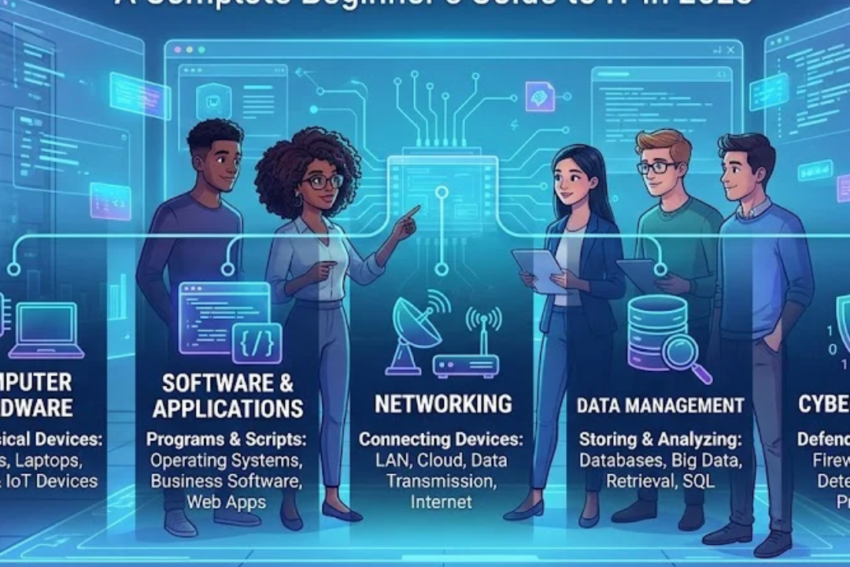
IT combines several elements, including:
- Computer hardware: Physical devices such as computers, servers, keyboards, and storage drives.
- Software: Operating systems, applications, and programs that perform specific tasks.
- Networks: Technologies that connect computers and allow them to exchange information.
- Data management: Systems used to organize, store, retrieve, and analyze information.
- Cybersecurity: Tools and practices that protect systems and information from unauthorized access.
- IT services: Technical support, system maintenance, troubleshooting, and technology management.
Together, these components help individuals and organizations use information effectively.
How Does Information Technology Work?
Information technology works by combining hardware, software, data, and networks to perform tasks.
Consider the example of an online shopping website.
First, a customer opens the website using a computer or smartphone. The device sends a request through the internet to the website’s server. The server processes the request, retrieves relevant product information from a database, and sends the results back to the customer’s screen.
If the customer places an order, the system records the purchase, processes payment through an appropriate payment service, updates inventory, and generates an order confirmation.
This process involves several IT components working together:
- Input: A user enters information or selects an option.
- Processing: Software and computer systems process the request.
- Storage: Relevant information is saved in databases or other storage systems.
- Communication: Networks transfer information between devices and services.
- Output: The system displays results or completes an action.
Many modern IT systems also use automation and artificial intelligence to perform certain tasks with less manual effort.
Major Components of Information Technology
Understanding the main components of IT helps beginners see how digital systems operate.
1. Computer Hardware
Hardware refers to the physical parts of a computer or technology system.
Common examples include:
- Desktop computers and laptops
- Servers and data storage devices
- Processors and memory modules
- Monitors, keyboards, and mice
- Routers, switches, and network equipment
Hardware provides the physical resources required to run software and process information.
For example, a processor executes instructions, RAM temporarily holds data that applications need, and storage devices keep files and programs for future use.
2. Software and Applications
Software consists of programs and instructions that tell hardware what to do.
There are two major categories of software.
System software manages the computer and provides a platform for applications. Examples include Windows, Linux, macOS, and device drivers.
Application software helps users perform specific tasks. Examples include word processors, web browsers, accounting applications, graphic design tools, and video conferencing programs.
Software is essential because even powerful hardware cannot perform useful tasks without appropriate instructions.
3. Computer Networks
A computer network connects two or more devices so they can communicate and share resources.
Common network types include:
- LAN (Local Area Network): Connects devices within a limited area, such as an office or school.
- WAN (Wide Area Network): Connects networks across larger geographical areas.
- WLAN (Wireless Local Area Network): Provides network connectivity through wireless technology, commonly Wi-Fi.
- VPN (Virtual Private Network): Creates an encrypted connection across a network to improve privacy and support secure remote access.
Networks allow employees to share files, access online services, communicate remotely, and use centralized systems.
4. Data Storage and Databases
Data is one of the most valuable resources in modern organizations. IT systems need reliable ways to store, organize, and retrieve it.
Storage technologies include hard disk drives, solid-state drives, network storage, and cloud-based storage services.
Databases organize information into structures that make it easier to search, update, and analyze.
For example, a hospital database might contain patient registration details, laboratory records, appointment information, and billing data. Access controls and appropriate security measures help protect sensitive information.
5. Cybersecurity
Cybersecurity involves protecting computers, networks, applications, and data against digital threats.
Common threats include phishing, malware, ransomware, password theft, and unauthorized access.
Important cybersecurity practices include:
- Using strong, unique passwords.
- Enabling multifactor authentication.
- Installing security updates promptly.
- Maintaining secure backups.
- Avoiding suspicious links and attachments.
- Restricting access to sensitive information.
- Training employees to recognize cyber threats.
Cybersecurity is no longer limited to large technology companies. Individuals, small businesses, schools, hospitals, and government organizations all need effective security practices.
6. Cloud Computing
Cloud computing allows users to access computing resources over a network, usually the internet, instead of relying entirely on equipment located on their premises.
Cloud services can provide storage, computing power, databases, software, and development platforms.
Examples of cloud services include online file storage, hosted business applications, and virtual servers.
Businesses use cloud computing to scale resources, support remote work, simplify deployment, and reduce the need to maintain every part of their own computing infrastructure.
Different Types of Information Technology
Information technology includes several specialized areas. Each focuses on particular systems, problems, or business needs.
Information Systems
Information systems combine technology, people, processes, and data to support organizational activities.
They are used for tasks such as managing customer records, tracking inventory, processing payments, and preparing business reports.
IT Support and Technical Services
IT support professionals help users resolve technology problems.
Their responsibilities may include installing software, configuring devices, fixing connectivity issues, managing user accounts, and maintaining computers.
This is often a practical entry point for people who want to begin an IT career.
Software Development
Software development involves designing, building, testing, and maintaining computer programs and applications.
Developers use programming languages and development tools to create websites, mobile applications, business software, and other digital products.
Network Administration
Network administrators maintain the systems that connect computers and other devices.
Their work can include configuring routers, monitoring network performance, managing wireless access, and resolving connectivity problems.
Cybersecurity
Cybersecurity specialists help organizations identify threats, protect information, investigate security incidents, and improve defensive systems.
Possible roles include security analyst, penetration tester, incident responder, and security engineer.
Data Management and Analytics
This area focuses on organizing data and turning it into useful information.
Data analysts examine information to identify patterns, measure performance, and support decisions. Database administrators maintain the systems used to store and retrieve data.
Cloud and Infrastructure Engineering
Cloud and infrastructure professionals build and maintain computing environments, including servers, networks, virtual machines, and cloud services.
Some specialize in automating infrastructure and deploying applications reliably.
Artificial Intelligence and Machine Learning
Artificial intelligence (AI) involves technologies designed to perform tasks associated with capabilities such as prediction, language processing, pattern recognition, and decision support.
Machine learning is a branch of AI in which systems learn patterns from data.
In IT environments, these technologies can support customer service, software development, fraud detection, system monitoring, and workflow automation. Their results still require appropriate testing, oversight, and security controls.
Importance of Information Technology in Everyday Life
Information technology has transformed how people communicate, access services, and manage daily responsibilities.
Communication
Email, messaging applications, video conferencing, and collaboration platforms allow people to communicate across geographical boundaries.
Businesses can coordinate remote teams, while families can stay connected regardless of distance.
Education
Digital learning platforms provide access to online classes, electronic books, educational videos, and virtual laboratories.
Students can learn new subjects and develop professional skills without always attending a physical classroom.
Healthcare
Hospitals, diagnostic laboratories, clinics, and other healthcare organizations use IT systems to manage appointments, maintain records, process test results, and support clinical workflows.
Secure digital systems can improve access to information and coordination between authorized healthcare professionals.
Banking and Finance
Online banking, digital payments, financial software, and fraud detection systems have changed how financial services are delivered.
Customers can perform many transactions electronically, while financial institutions use IT to monitor activity and protect accounts.
Business Operations
Companies use information technology for accounting, inventory management, customer relationship management, human resources, communication, and reporting.
These systems can reduce repetitive work and help managers make more informed decisions.
Government Services
Governments use digital platforms for applications, registrations, tax services, public information, and record management.
Well-designed digital services can make certain administrative processes more accessible and efficient.
Benefits of Information Technology
Information technology offers many advantages when it is implemented and managed properly.
1. Improved efficiency: Software and automation can reduce repetitive manual work.
2. Faster communication: Networks allow information to move quickly between individuals and organizations.
3. Better data management: Digital systems help organize large volumes of information and retrieve it when needed.
4. Remote access: Cloud platforms and secure remote connections support work and collaboration from different locations.
5. Improved decision-making: Reporting tools and analytics help organizations understand performance and identify trends.
6. Greater scalability: Businesses can expand many IT services as their requirements grow.
7. Enhanced customer service: Online platforms and digital support systems can make services more convenient.
8. New career opportunities: IT creates opportunities across technical support, software development, cybersecurity, cloud computing, data analytics, and many other specialties.
However, these benefits depend on appropriate planning, investment, employee training, and ongoing maintenance.
Challenges and Disadvantages of Information Technology
Although IT offers major advantages, it also introduces challenges.
Cybersecurity Risks
Connected systems can be exposed to hacking, phishing, malware, and data breaches. Organizations must invest in prevention, monitoring, recovery planning, and staff awareness.
Privacy Concerns
Digital platforms may collect large amounts of personal and organizational information. Poor data handling can expose sensitive details or undermine user trust.
Implementation Costs
Hardware, software subscriptions, cloud services, staff training, and technical support can require significant investment.
Technical Failures
Hardware breakdowns, software defects, network interruptions, and power failures can disrupt operations.
Skill Gaps
Technology changes quickly, and employees may need continuous training to use new tools safely and effectively.
Dependence on Technology
Overreliance on digital systems can create problems when services become unavailable. Backup systems, documented procedures, and disaster recovery plans help reduce this risk.
Organizations can manage many of these challenges through strong security practices, regular maintenance, sensible budgeting, and careful technology planning.
Latest Information Technology Trends in 2026
IT continues to evolve as organizations adopt new tools and update existing systems. Several important trends are shaping the field.
1. Artificial Intelligence and Automation
AI tools are being used to support document processing, software development, customer service, data analysis, and IT operations.
Organizations increasingly need professionals who can evaluate AI-generated outputs, integrate tools into existing workflows, and manage the associated privacy and security risks.
2. Cloud-Native Technology
Businesses continue to use cloud platforms, containers, managed services, and automated deployment tools to build and operate applications.
Professionals who understand cloud infrastructure, networking, identity management, and cost control can support these environments.
3. Cybersecurity and Zero-Trust Approaches
As organizations adopt remote work and cloud services, identity protection and access management remain important.
Zero-trust security emphasizes verifying access requests and limiting permissions rather than automatically trusting users or devices because they are inside a network.
4. Data Engineering and Analytics
Organizations need reliable data pipelines, well-managed databases, and accurate reporting to make effective use of information.
Data quality, governance, privacy, and analytical skills remain important alongside new AI capabilities.
5. Edge Computing and Internet of Things
Edge computing processes some data closer to the devices that generate it, rather than sending everything to a distant data center.
This can be useful for industrial equipment, connected sensors, smart buildings, and applications that require quick responses.
6. IT Automation and Platform Engineering
Organizations increasingly automate routine infrastructure tasks and standardize how developers build and deploy software.
Automation can improve consistency, but it also requires testing, monitoring, access controls, and clear recovery procedures.
These trends do not mean every beginner must learn every technology. The best starting point depends on personal interests, available resources, and career goals.
Best IT Skills to Learn in 2026
If you want to enter the IT field, start by building a strong foundation before moving into advanced subjects.
Essential Beginner Skills
- Computer hardware and operating system fundamentals
- File management and software installation
- Basic networking concepts
- Troubleshooting and problem-solving
- Online safety and cybersecurity fundamentals
- Command-line basics
- Technical communication and documentation
Specialized Skills
After learning the basics, consider developing skills in one of the following areas:
| Career direction | Useful skills to develop |
|---|---|
| IT support | Windows or Linux basics, troubleshooting, networking, ticketing systems |
| Software development | Python or JavaScript, programming fundamentals, Git, testing |
| Cybersecurity | Networking, Linux, security fundamentals, log analysis |
| Cloud computing | Linux, networking, cloud services, identity and access management |
| Data analytics | Excel, SQL, statistics, data visualization |
| Web development | HTML, CSS, JavaScript, responsive design |
| AI and machine learning | Python, mathematics, data preparation, model evaluation |
You do not need to master every skill before applying for an entry-level position. Focus on a manageable set of relevant skills and demonstrate them through practical projects.
How to Start a Career in Information Technology
A career in IT can begin through formal education, vocational training, online courses, self-study, or a combination of these approaches.
Follow these steps to build your foundation.
Step 1: Learn computer fundamentals. Understand hardware, operating systems, files, applications, and common computer problems.
Step 2: Study basic networking. Learn how IP addresses, routers, DNS, Wi-Fi, and internet connections work.
Step 3: Choose a specialization. Explore technical support, networking, programming, cybersecurity, data analytics, or cloud computing.
Step 4: Practice through projects. Set up a small home network, write a basic program, build a simple website, or practice troubleshooting in a virtual machine.
Step 5: Build a portfolio. Document your projects, explain the problems you solved, and describe the tools you used.
Step 6: Consider relevant certifications. Depending on your chosen path, entry-level IT, networking, cloud, or cybersecurity certifications may help structure your learning. Check current exam requirements and costs before enrolling.
Step 7: Apply for suitable entry-level roles. Look for positions such as IT support technician, help desk analyst, junior web developer, or trainee network technician, depending on your skills.
Consistency and hands-on practice are often more valuable than collecting courses without applying what you learn.
Common Information Technology Career Opportunities
Information technology offers many career paths. Job requirements and salaries vary by country, employer, experience, and specialization.
Popular roles include:
- IT Support Technician: Resolves common computer, software, and connectivity problems.
- Systems Administrator: Maintains servers, operating systems, user accounts, and IT infrastructure.
- Network Administrator: Configures and monitors networks.
- Software Developer: Creates and maintains applications.
- Cybersecurity Analyst: Monitors risks and helps protect systems and data.
- Data Analyst: Examines data and produces reports that support decisions.
- Cloud Engineer: Builds and maintains cloud infrastructure and services.
- Database Administrator: Maintains database performance, availability, and security.
- IT Project Manager: Coordinates technology projects, schedules, resources, and stakeholders.
- IT Business Analyst: Helps translate business requirements into technology solutions.
Choose a role based on the kind of work you enjoy. People who like diagnosing problems may prefer IT support, while those who enjoy logic and building applications may prefer programming.
Frequently Asked Questions (FAQs)
What is Information Technology in simple words?
Information Technology is the use of computers, software, networks, and digital systems to store, process, protect, and share information.
What are the five main components of IT?
Five major components are hardware, software, networks, data storage and management, and cybersecurity. IT services and people are also essential to operating technology effectively.
Is IT a good career choice in 2026?
IT can be a rewarding career for people who enjoy problem-solving and continuous learning. Opportunities depend on the specialty, practical skills, local job market, and employer requirements.
Can I learn IT without a computer science degree?
Yes. Many IT skills can be learned through self-study, practical projects, vocational training, and certifications. Some employers and specialized positions still require a relevant degree or other formal qualifications.
How long does it take to learn IT?
The time required depends on your starting point and career goal. Basic computer and networking skills may take weeks or months to develop, while job-ready skills in a specialized field usually require sustained practice and experience.
Which IT field is best for beginners?
IT support is a practical starting point for people who enjoy troubleshooting. Web development may suit people who like building applications, while data analytics may appeal to those who enjoy working with information and patterns.
What is the difference between IT and computer science?
Information Technology focuses primarily on using, managing, securing, and maintaining technology systems. Computer science focuses more on computing principles, algorithms, programming theory, and the design of computational systems. The two fields overlap considerably.
Does IT require programming?
Not every IT role requires extensive programming. IT support and many infrastructure roles can begin with limited coding, although scripting and automation can be valuable. Software development and machine learning generally require more programming knowledge.
Conclusion
Information Technology is the foundation of many modern digital services, business operations, communication systems, and data-driven processes. It combines hardware, software, networking, data management, cybersecurity, and technical services to help people and organizations use information effectively.
In 2026, developments in artificial intelligence, cloud computing, cybersecurity, data analytics, and automation continue to create new opportunities and new challenges.
For beginners, the best approach is to understand the fundamentals, choose a specialization, practice through real projects, and continue learning as technology evolves. You do not need to master everything at once. Start with the basics and build your skills step by step.
Explore more technology guides on Jobztit to learn about IT careers, cloud computing, cybersecurity, software development, and emerging digital technologies.