Meta Description: Learn what cloud computing is, how it works, its main types, benefits, challenges, and real-world examples. Explore cloud services and career opportunities in 2026.
URL Slug: cloud-computing-explained
Primary Keyword: Cloud Computing
Secondary Keywords: What is cloud computing, types of cloud computing, cloud computing benefits, cloud storage, cloud services, public cloud vs private cloud, cloud computing careers
Introduction
Cloud computing has become one of the most important technologies in modern Information Technology (IT). It allows individuals and businesses to access computing resources such as storage, servers, databases, software, and networking services over the internet without having to own and maintain every part of the underlying infrastructure.
Today, people use cloud computing when they store photos online, collaborate on documents, stream videos, back up files, or access web-based applications. Businesses use it to host websites, run applications, manage data, support remote employees, and scale their operations.
Instead of purchasing expensive servers and maintaining large data centers themselves, organizations can obtain computing resources from cloud service providers and pay according to their chosen service and usage model.
But how does cloud computing actually work? What are its different types, and why are organizations investing in it?
In this guide, we will explain cloud computing in simple terms, explore its major service models, discuss its advantages and disadvantages, and examine the skills beginners can learn to pursue a career in cloud technology.
What Is Cloud Computing?
Cloud computing is the delivery of computing resources and services over a network, usually the internet. These resources can include computing power, data storage, databases, networking, software, analytics, and development tools.
In simple words, cloud computing allows you to use computing resources hosted elsewhere instead of relying entirely on your own computer or local equipment.
For example, when you save a document in an online storage service, the file is stored on remote infrastructure managed by a provider. You can access it from another compatible device by signing in to your account, subject to the service’s availability and access controls.
Similarly, a business can host its website on cloud infrastructure instead of purchasing and maintaining a physical server at its office.
Cloud computing is not simply another name for the internet. The internet provides connectivity, while cloud computing delivers computing resources and services that users access through that connectivity.
How Does Cloud Computing Work?
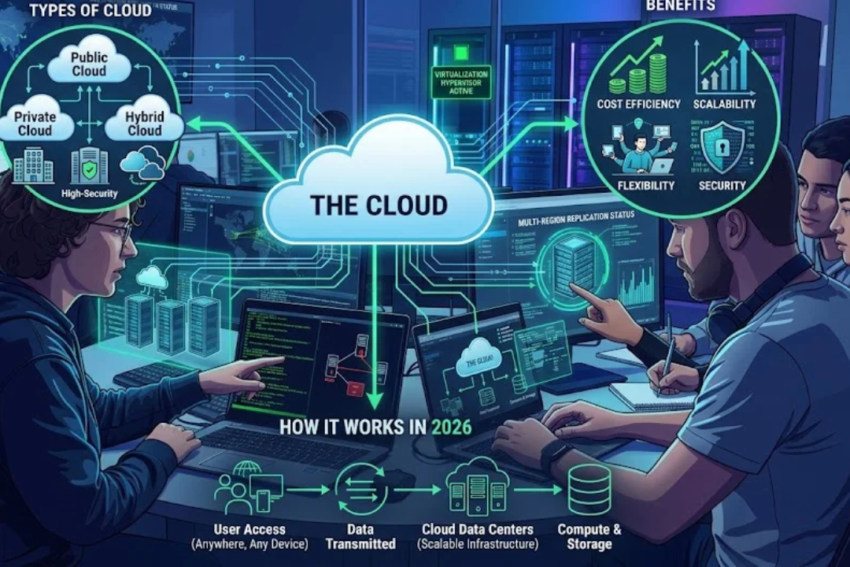
Cloud computing relies on a combination of data centers, physical servers, virtualization, networking, software, and management systems.
Cloud providers operate infrastructure in facilities that contain servers, storage equipment, networking devices, power systems, and cooling systems. Software manages these resources and makes them available to customers through cloud platforms.
When a user requests a service, the provider’s systems process that request and supply the necessary resources.
Here is a simplified example of how cloud storage works:
- User action: You upload a photo from your smartphone.
- Network communication: Your device sends the photo through an internet connection.
- Cloud processing: The storage service receives the file and processes the upload request.
- Data storage: The file is saved on the provider’s storage infrastructure.
- Access: You can later retrieve the photo from another authorized device.
Cloud providers may use redundancy, replication, monitoring, and backup systems to improve reliability. However, the level of protection depends on the provider, service configuration, and plan. Cloud storage does not automatically guarantee that every file is backed up or recoverable.
The Role of Virtualization
Virtualization is a technology that allows one physical computer to support multiple isolated virtual environments.
For example, a powerful physical server can run several virtual machines, each with its own operating system and allocated resources.
Virtualization helps cloud providers use infrastructure efficiently and allocate resources to different customers. Other approaches, including containers and serverless platforms, also play important roles in modern cloud environments.
Main Types of Cloud Computing
Cloud computing environments are commonly classified according to how they are deployed and managed.
1. Public Cloud
A public cloud is operated by a cloud service provider that makes computing resources available to multiple customers.
Customers use logically separated environments, while the provider manages the underlying infrastructure.
Public cloud services are often useful for startups, developers, small businesses, and large organizations that need flexible computing resources.
Examples of public cloud providers include:
- Amazon Web Services (AWS)
- Microsoft Azure
- Google Cloud
Advantages of public cloud:
- Access to a wide range of services
- Flexible resource allocation
- Reduced need to purchase physical infrastructure
- Global service options
- Managed infrastructure and maintenance
Potential disadvantages:
- Costs can increase if resources are not monitored.
- Customers have less direct control over the physical infrastructure.
- Security and compliance require appropriate configuration.
- Applications may become dependent on provider-specific services.
2. Private Cloud
A private cloud is an environment dedicated to one organization. It may be operated by the organization itself or managed by an external provider.
Private cloud environments are sometimes used by organizations that require greater control over infrastructure, access, and configuration.
For example, a financial institution or healthcare organization may choose a private environment for specific workloads that have strict security or regulatory requirements.
Advantages of private cloud:
- Greater control over configuration
- Ability to customize the environment
- Potentially stronger alignment with specific compliance requirements
- Dedicated resources for the organization
Potential disadvantages:
- Higher setup and operating costs in some environments
- Greater management responsibilities
- Need for qualified technical staff
- Capacity planning and maintenance requirements
A private cloud is not automatically more secure than a public cloud. Security depends on architecture, configuration, access controls, monitoring, and operational practices.
3. Hybrid Cloud
A hybrid cloud combines private infrastructure with public cloud services in an integrated environment.
For example, a company may keep certain sensitive systems in a private environment while using public cloud resources for its website, analytics, or temporary increases in computing demand.
This approach can help organizations balance control, flexibility, and cost.
Advantages of hybrid cloud:
- Flexible workload placement
- Support for gradual cloud migration
- Ability to retain selected existing systems
- Additional options for managing capacity
Challenges:
- More complex infrastructure management
- Need for reliable connections between environments
- Difficulties in maintaining consistent security policies
- Potentially complicated data movement and monitoring
Hybrid cloud works best when an organization has a clear strategy for deciding which applications and data belong in each environment.
4. Community Cloud
A community cloud is designed for organizations that share specific requirements, such as security, policy, compliance, or operational needs.
For example, several organizations within a sector might use a shared cloud environment designed around their common requirements.
The infrastructure may be managed by one or more participating organizations or by a service provider.
Community cloud is less common in general discussions than public, private, and hybrid cloud, but it remains a useful deployment model for certain shared environments.
Cloud Computing Service Models
Cloud services are also classified according to the level of management provided by the cloud provider.
The three traditional service models are Infrastructure as a Service (IaaS), Platform as a Service (PaaS), and Software as a Service (SaaS).
1. Infrastructure as a Service (IaaS)
IaaS provides fundamental computing resources such as virtual machines, storage, and networking.
Customers can create servers and configure operating systems and applications without purchasing the underlying physical hardware.
Example: A developer rents a virtual server to host a website.
The cloud provider manages the physical infrastructure, while the customer typically remains responsible for much of the operating system, application, and configuration management.
IaaS is useful for businesses that need flexibility and control without operating their own physical data center.
2. Platform as a Service (PaaS)
PaaS provides a managed platform for developing, deploying, and running applications.
It reduces the need for developers to manage every detail of the underlying servers and operating systems.
Example: A software team deploys a web application using a managed application platform.
The provider handles much of the infrastructure management, allowing the team to focus more on application code and functionality.
PaaS is useful for developers who want to build applications without spending as much time maintaining servers.
3. Software as a Service (SaaS)
SaaS delivers software through the internet, usually through a browser or application.
The service provider manages the application and much of its underlying infrastructure.
Examples include:
- Online email services
- Web-based office applications
- Customer relationship management software
- Online project management tools
- Cloud-based accounting applications
SaaS allows users to access software without managing the entire installation and hosting environment themselves.
Understanding the Difference
| Feature | IaaS | PaaS | SaaS |
|---|---|---|---|
| Main offering | Computing infrastructure | Application development platform | Ready-to-use software |
| User focus | Servers and systems | Building and deploying applications | Using an application |
| Infrastructure management | Shared, with more customer responsibility | More provider-managed | Mostly provider-managed |
| Typical user | IT teams and system administrators | Developers | Individuals and businesses |
| Example use | Hosting a virtual server | Deploying a web application | Using online email |
The amount of responsibility retained by the customer varies by service and configuration. Even when a provider manages most of the infrastructure, customers still need to manage appropriate access, data handling, and account security.
Real-World Applications of Cloud Computing
Cloud computing supports many services that people and organizations use every day.
Cloud Storage and Backup
Individuals can store documents, photos, and other files in online storage systems.
Businesses can use cloud storage for shared files, archival data, and recovery systems.
However, synchronization and backup are not the same thing. If a deleted or damaged file synchronizes across devices, the same problem may affect multiple copies. Important data should have a suitable backup and recovery strategy.
Website and Application Hosting
Businesses can host websites, online stores, mobile application backends, and business platforms on cloud infrastructure.
Cloud services can provide computing resources, databases, content delivery, and monitoring tools to support these applications.
Online Education
Educational organizations use cloud-based learning management systems, video conferencing, online assessments, and digital libraries.
Students can access course materials from different devices, while instructors can distribute resources and manage coursework online.
Healthcare and Medical Services
Healthcare organizations can use cloud services for appointment systems, administrative applications, medical data processing, research computing, and secure collaboration.
These systems require careful attention to privacy, access controls, applicable regulations, and data residency requirements. Sensitive health information should only be handled using appropriately configured and approved services.
Business Collaboration
Cloud-based productivity tools allow employees to collaborate on documents, manage projects, share calendars, and attend virtual meetings.
These tools can be especially useful for organizations with distributed teams or employees working remotely.
Data Analytics and Artificial Intelligence
Cloud platforms provide computing resources for processing large datasets, running analytical workloads, and developing AI applications.
Organizations can access specialized computing resources when needed instead of purchasing all the hardware themselves.
E-Commerce
Online retailers can use cloud infrastructure to host shopping websites, process orders, manage product databases, and respond to changes in customer demand.
Some services allow businesses to scale capacity during busy periods, although scaling must be configured correctly and can increase costs.
Benefits of Cloud Computing
Cloud computing offers several potential advantages when the services are selected and managed appropriately.
1. Lower Initial Infrastructure Costs
Businesses may avoid purchasing large amounts of server hardware before launching a service.
Instead, they can start with a smaller cloud environment and increase resources as needed. This reduces certain upfront costs, although ongoing cloud expenses can still be substantial.
2. Scalability and Flexibility
Cloud resources can often be increased or reduced according to demand.
For example, an online store may need additional capacity during a major sale and less capacity during quieter periods.
This flexibility can help businesses respond to changing requirements.
3. Remote Accessibility
Cloud services can make applications and data available from different locations, provided users have appropriate access and a reliable connection.
This supports remote work, distributed teams, and collaboration between offices.
4. Faster Deployment
Organizations can provision computing resources without waiting to purchase, install, and configure physical servers.
This can shorten the time required to test ideas, develop applications, and launch digital services.
5. Access to Advanced Technology
Cloud providers offer managed databases, analytics platforms, AI tools, monitoring systems, and other services that may be difficult or expensive to build independently.
6. Maintenance Support
Depending on the service model, the provider handles tasks such as physical equipment maintenance, infrastructure updates, and platform operations.
This can reduce the operational workload for internal IT teams.
7. Business Continuity Options
Cloud platforms can support backup, replication, and recovery across different locations.
These capabilities can improve resilience when configured and tested properly. Businesses still need clear recovery objectives and a plan for restoring critical systems.
Disadvantages and Challenges of Cloud Computing
Despite its advantages, cloud computing is not the ideal solution for every situation.
Internet and Network Dependence
Many cloud services require reliable network connectivity. A network outage can prevent users from accessing remote applications or data.
Some services offer offline functionality, but the available features vary.
Ongoing Costs
Cloud services often charge according to resource usage, subscriptions, data transfer, storage, and other factors.
Unexpected costs can occur when resources are left running, storage grows without review, or applications transfer large amounts of data.
Organizations should use budgets, alerts, cost reports, and resource-management policies.
Security and Privacy Risks
Cloud services can be affected by misconfigured permissions, stolen credentials, vulnerable applications, or other security problems.
Cloud security is a shared responsibility. Providers protect their underlying services according to their model, while customers must correctly configure access, applications, data, and other responsibilities assigned to them.
Vendor Lock-In
Some applications become closely tied to a provider’s specialized services.
Moving them to another platform may require changes to software, architecture, data formats, or operational procedures.
Organizations can reduce this risk by evaluating portability requirements before making major architectural decisions.
Compliance and Data Residency
Certain organizations must follow legal, contractual, or industry-specific requirements concerning where data is stored and who can access it.
They should review relevant requirements before selecting a cloud provider and region.
Service Outages
Cloud providers can experience service interruptions. Even if the provider is operating normally, a customer application may fail because of its own configuration or dependencies.
Monitoring, recovery plans, and appropriate redundancy can help reduce the impact.
Cloud Computing vs. Traditional Computing
Traditional computing often relies on physical equipment that an organization owns or directly controls. Cloud computing uses resources delivered as services through a provider.
| Feature | Traditional computing | Cloud computing |
|---|---|---|
| Infrastructure | Often owned or directly managed | Provider-operated or managed resources |
| Initial investment | May require substantial hardware purchases | Can start with lower upfront infrastructure spending |
| Scaling | May require buying and installing equipment | Often supports faster resource adjustments |
| Maintenance | Organization manages much of the infrastructure | Responsibilities vary by service model |
| Access | Depends on system and network configuration | Commonly supports access over networks |
| Cost model | Hardware, maintenance, and operating costs | Usage-based, subscription, and other pricing models |
| Control | Often greater direct control over hardware | Less direct control over provider infrastructure |
Neither approach is universally better. Some organizations benefit from cloud services, while others need on-premises infrastructure or a combination of both.
How to Choose the Right Cloud Service
Before selecting a cloud solution, consider your actual requirements rather than choosing a service simply because it is popular.
Identify Your Requirements
Determine what you need to host or store. A personal backup service has different requirements from a business application that handles sensitive customer data.
Compare Pricing
Review subscription fees, storage charges, computing costs, data transfer fees, support plans, and potential additional expenses.
Use pricing calculators where available and estimate likely usage before committing to a large deployment.
Review Security Features
Check authentication options, permission controls, encryption capabilities, logging, monitoring, and backup features.
Ensure the service meets your organization’s security and privacy requirements.
Check Reliability and Recovery Options
Review service availability commitments, backup capabilities, recovery procedures, and the provider’s documented service limitations.
For important workloads, test recovery procedures instead of assuming that a backup will always work.
Consider Future Growth
Choose a service that can accommodate expected changes in workload, users, storage, and performance requirements.
Evaluate Support and Documentation
Good technical documentation, support options, and learning resources can make cloud adoption easier, especially for smaller teams.
Cloud Computing Trends in 2026
Cloud computing continues to evolve as organizations modernize their IT systems.
1. AI and Machine Learning Services
Cloud platforms provide access to tools for training, deploying, and operating AI models. Organizations can use these services for analytics, automation, and application development.
Successful adoption still requires data governance, security, evaluation, and cost management.
2. Serverless Computing
Serverless services allow developers to run code or application components without managing the underlying servers directly.
The provider handles much of the infrastructure management, while billing and scaling depend on the specific service.
Despite the name, serverless computing still relies on servers.
3. Hybrid and Multicloud Environments
Some organizations use a combination of private infrastructure and public cloud services. Others use services from more than one cloud provider.
These approaches can support specific technical or business requirements, but they may also increase management and security complexity.
4. Cloud Security and Identity Management
Organizations continue to focus on secure access, strong identity verification, continuous monitoring, and appropriate data protection.
Misconfigured cloud resources and compromised accounts remain important risks to address.
5. FinOps and Cloud Cost Optimization
FinOps brings financial accountability into cloud operations. Teams work together to understand cloud spending, allocate costs, improve resource use, and make informed trade-offs between cost and performance.
6. Edge Computing
Edge computing moves certain processing tasks closer to the devices or locations that generate data.
It can complement cloud computing in applications such as connected industrial systems, smart devices, and time-sensitive monitoring.
These developments create opportunities for professionals who understand cloud fundamentals as well as security, networking, automation, and application design.
Cloud Computing Careers and Skills for Beginners
Cloud technology has created career opportunities across infrastructure, software development, security, data management, and technical support.
Common roles include:
- Cloud Support Associate: Helps customers troubleshoot cloud services and configurations.
- Cloud Engineer: Builds and maintains cloud environments.
- Cloud Administrator: Manages accounts, resources, permissions, and operational tasks.
- Cloud Security Engineer: Helps protect cloud workloads and infrastructure.
- DevOps Engineer: Automates software deployment and infrastructure operations.
- Cloud Architect: Designs cloud systems based on business, technical, security, and cost requirements.
- Site Reliability Engineer: Improves the reliability and operational performance of software services.
Skills Worth Learning
Beginners should build their knowledge in stages.
Start with IT fundamentals:
- Computer hardware and operating systems
- Networking, IP addressing, and DNS
- Linux and command-line basics
- Security fundamentals
Then learn cloud concepts:
- Virtual machines and storage
- Cloud networking
- Identity and access management
- Databases and monitoring
- Backup and recovery
Develop practical experience:
- Create a small cloud-hosted website.
- Deploy a basic application.
- Configure a virtual machine.
- Set up access permissions.
- Monitor resource usage and estimate costs.
You can also explore introductory learning resources and certification paths from AWS, Microsoft Azure, and Google Cloud. Check the official certification requirements and current fees before scheduling an exam.
Frequently Asked Questions (FAQs)
What is cloud computing in simple words?
Cloud computing means accessing computing resources, such as storage, servers, software, and databases, through a network rather than managing all the equipment yourself.
What are the four types of cloud computing?
The four commonly discussed deployment models are public cloud, private cloud, hybrid cloud, and community cloud.
What are the three main cloud service models?
The traditional models are Infrastructure as a Service (IaaS), Platform as a Service (PaaS), and Software as a Service (SaaS).
Is cloud computing safe?
Cloud computing can be secure when appropriate services and configurations are used. Security depends on factors such as access controls, encryption, monitoring, provider practices, and customer responsibilities.
Is cloud computing free?
Some providers offer free tiers, limited free services, or introductory credits. These offers have restrictions, and charges may apply when usage exceeds the included limits. Always review the current pricing terms.
Do I need programming skills to learn cloud computing?
Not every cloud role requires extensive programming. However, scripting and programming are useful for automation, application deployment, and advanced infrastructure work.
Which cloud platform should beginners learn first?
AWS, Microsoft Azure, and Google Cloud are all reasonable options. Choose one based on your learning goals, available resources, local job opportunities, and the types of systems you want to work with.
What is the difference between cloud storage and cloud computing?
Cloud storage is a service for storing and retrieving data. Cloud computing is a broader concept that includes storage along with processing, networking, databases, application platforms, and other computing resources.
Conclusion
Cloud computing has changed how individuals and organizations access computing resources. By delivering storage, servers, software, databases, and other services over networks, it can help businesses deploy applications faster, adjust resources to changing needs, and access technologies that would otherwise require significant infrastructure investment.
However, cloud adoption also requires careful decisions about cost, security, privacy, reliability, and technical management. A successful cloud strategy matches the chosen services to real requirements and includes appropriate monitoring and recovery plans.
For beginners, the best way to enter this field is to understand IT and networking fundamentals, choose a cloud platform, practice with small projects, and gradually develop skills in automation, security, and infrastructure management.
Explore more technology guides on Jobztit to learn about Information Technology, cybersecurity, artificial intelligence, networking, and other important areas of the digital world.