Meta Description: Discover how artificial intelligence is transforming IT in 2026. Explore AI applications, benefits, challenges, real-world examples, and career opportunities.
URL Slug: artificial-intelligence-in-information-technology
Primary Keyword: Artificial Intelligence in Information Technology
Secondary Keywords: AI in IT, artificial intelligence applications, benefits of AI, AI in cybersecurity, AI automation, machine learning, future of artificial intelligence
Introduction
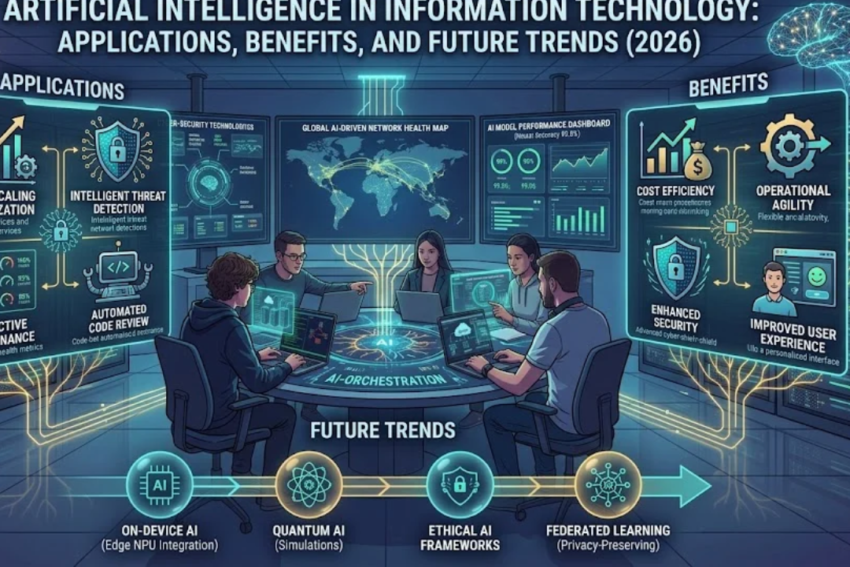
Artificial Intelligence (AI) is changing how organizations use technology, manage information, protect digital systems, and solve complex problems. From automated customer support to cybersecurity monitoring and software development, AI has become an important part of modern Information Technology (IT).
Businesses increasingly use AI-powered tools to analyze data, automate repetitive tasks, detect unusual activity, improve customer experiences, and support decision-making. IT professionals are also exploring how AI can simplify troubleshooting, monitor infrastructure, and improve application development.
However, artificial intelligence is not a replacement for every IT task. AI systems can make mistakes, produce misleading results, expose sensitive information, and require human supervision. Understanding both the opportunities and limitations of AI is essential for using it effectively.
In this guide, we will explain what artificial intelligence means in IT, explore its major applications, discuss its benefits and challenges, and examine the skills beginners can develop to prepare for an AI-enabled technology industry in 2026.
What Is Artificial Intelligence in Information Technology?
Artificial Intelligence refers to technologies that enable computer systems to perform tasks commonly associated with human cognitive abilities, such as recognizing patterns, understanding language, making predictions, and generating content.
In Information Technology, AI is used to improve software, automate processes, analyze large datasets, monitor infrastructure, and assist technical teams.
For example, a traditional IT monitoring system might notify an administrator when a server’s CPU usage exceeds a predefined threshold. An AI-assisted monitoring system may analyze historical patterns and multiple performance indicators to help identify unusual behavior or predict a potential problem.
Similarly, an AI-powered support tool can interpret a user’s description of a computer issue and suggest possible troubleshooting steps.
AI in IT includes several technologies, such as:
- Machine learning: Systems learn patterns from data to make predictions or classifications.
- Natural language processing: Technologies process and generate human language.
- Computer vision: Systems analyze images and video.
- Generative AI: Models generate content such as text, code, images, and summaries.
- Intelligent automation: AI capabilities are combined with workflows to reduce repetitive work.
- Predictive analytics: Models use historical data to estimate likely future outcomes.
These technologies serve different purposes, and not every AI system uses all of them.
How Does AI Work in IT?
AI systems typically rely on data, algorithms, computational resources, and models that have been trained or configured for particular tasks.
Although the details vary, a common AI workflow includes the following stages.
1. Data Collection
An AI system receives information relevant to its task. This might include system logs, text documents, images, software code, or structured business records.
The data must be collected and handled appropriately, especially when it contains personal, confidential, or sensitive information.
2. Data Preparation
Data is cleaned, organized, and checked for errors or inconsistencies. Poor-quality data can lead to unreliable results.
For machine learning, preparation may also involve selecting relevant features, labeling examples, and separating data used for training from data used for evaluation.
3. Model Training or Configuration
A machine learning model learns patterns from training data. Other AI systems may use predefined rules, pretrained models, or combinations of different approaches.
Generative AI models are often pretrained on large datasets and then adapted or guided for particular tasks.
4. Processing and Prediction
When the system receives new information, it uses its model to generate a prediction, classification, recommendation, or response.
For example, an AI security tool may assign a risk score to suspicious network activity.
5. Evaluation and Monitoring
Developers and IT teams assess whether the system performs reliably. They may examine accuracy, false alarms, security, response time, and performance across different types of inputs.
AI systems require ongoing monitoring because data, user behavior, and operating conditions can change.
Major Applications of AI in Information Technology
Artificial intelligence is being applied across several areas of IT. The usefulness of each application depends on the quality of the system, the task being performed, and how results are reviewed.
1. AI in IT Support and Troubleshooting
IT support teams handle problems such as software errors, account access issues, slow computers, and network connectivity failures.
AI-powered tools can help support staff by:
- Suggesting troubleshooting steps based on a problem description.
- Searching technical documentation for relevant solutions.
- Summarizing support tickets.
- Categorizing incoming requests.
- Identifying recurring technical problems.
- Generating draft responses to common questions.
For example, an employee who cannot connect to an office network might describe the error to an AI assistant. The tool could recommend checking Wi-Fi settings, confirming network availability, and reviewing the device’s IP configuration.
The technician should still verify the diagnosis before making changes, particularly when troubleshooting involves security settings or critical systems.
2. AI in Cybersecurity
Cybersecurity teams use AI and machine learning to help identify suspicious activity and prioritize potential threats.
Security tools may analyze large volumes of events, including login attempts, network traffic, endpoint activity, and system logs.
Potential applications include:
Threat detection: Identifying patterns associated with malicious activity.
Anomaly detection: Highlighting activity that differs from established behavior.
Phishing analysis: Helping classify suspicious messages, links, and attachments.
Incident investigation: Summarizing security alerts and helping analysts investigate related events.
Threat intelligence: Organizing information about emerging threats and known indicators of compromise.
AI can help security teams process information more quickly, but it does not eliminate the need for expert analysis. Attackers can also use AI to improve phishing messages, automate reconnaissance, and develop more convincing scams.
Effective cybersecurity still requires secure configurations, access controls, regular updates, incident response plans, and trained personnel.
3. AI in Software Development
AI-powered coding assistants can support software developers throughout the development process.
They may help programmers:
- Generate code suggestions.
- Explain unfamiliar code.
- Draft unit tests.
- Identify potential bugs.
- Summarize existing projects.
- Create technical documentation.
- Suggest possible approaches to a programming problem.
For example, a developer creating a website may ask an AI assistant to explain a JavaScript error or draft a function that validates user input.
These tools can improve productivity when used carefully, but generated code may contain bugs, security weaknesses, outdated patterns, or incorrect assumptions.
Developers should review generated code, run tests, check dependencies, and follow secure coding practices before using it in production.
4. AI in Network Management
Modern networks generate substantial amounts of operational data. AI-assisted tools can analyze this information to help administrators understand performance and identify potential issues.
Applications include:
- Detecting unusual traffic patterns.
- Identifying possible network congestion.
- Analyzing connectivity problems.
- Helping prioritize network alerts.
- Supporting capacity planning.
- Recommending configuration improvements.
For instance, an organization may use network monitoring data to identify a recurring slowdown during certain hours. An AI-assisted analysis could help narrow down possible causes for further investigation.
AI recommendations should be checked against actual network measurements and operational requirements before administrators change configurations.
5. AI in Cloud Computing
Cloud environments contain many connected services, virtual machines, databases, applications, and access policies.
AI can help cloud teams analyze performance, monitor resource usage, investigate incidents, and identify potential cost inefficiencies.
Common applications include:
Resource optimization: Identifying resources that may be underused or unnecessarily expensive.
Operational monitoring: Summarizing alerts and highlighting unusual system behavior.
Security analysis: Helping review access patterns and configuration risks.
Application development: Assisting with cloud deployment scripts and infrastructure documentation.
Capacity planning: Estimating future resource requirements from historical patterns.
AI-generated recommendations should be reviewed before they trigger actions such as deleting resources, changing permissions, or modifying production infrastructure.
6. AI in Data Analytics
Data analytics involves examining information to identify patterns, measure performance, and support decisions.
AI can extend traditional analytics by helping users detect relationships, classify information, generate summaries, and create predictive models.
Businesses may use AI-assisted analytics to:
- Forecast demand.
- Identify unusual transactions.
- Analyze customer feedback.
- Summarize reports.
- Estimate equipment maintenance needs.
- Support business planning.
However, predictions are not guarantees. Results depend on data quality, assumptions, model design, and changes in real-world conditions.
Organizations should verify important findings and avoid treating AI-generated explanations as proof of causation.
7. AI in Database Management
Databases are essential for storing and retrieving information in websites, business systems, healthcare platforms, and financial applications.
AI-assisted database tools can help administrators analyze query performance, identify possible bottlenecks, summarize database activity, and suggest optimization strategies.
Some platforms also provide automated recommendations for indexing, resource allocation, and performance management.
Database administrators remain responsible for protecting information, maintaining data integrity, planning backups, and validating changes before applying them to critical systems.
8. AI in IT Documentation and Knowledge Management
IT teams maintain technical documents, troubleshooting procedures, configuration records, and internal knowledge bases.
AI tools can help summarize long documents, search for relevant procedures, organize technical information, and draft updated documentation.
For example, an IT department might use an AI assistant to summarize a long incident report and prepare a draft list of corrective actions.
The resulting document should be checked for accuracy, completeness, and confidential information before it is shared.
Benefits of Artificial Intelligence in IT
AI can provide meaningful advantages when it is introduced for appropriate tasks and supported by good processes.
1. Automation of Repetitive Tasks
AI can assist with routine activities such as ticket classification, document summarization, and initial analysis of system alerts.
This can allow IT professionals to spend more time on complex problems.
2. Faster Analysis of Large Datasets
IT systems generate extensive logs, events, and performance measurements. AI can help identify patterns in this information more efficiently than manual review alone.
3. Improved Troubleshooting Support
AI assistants can suggest diagnostic steps, explain error messages, and help technicians locate relevant documentation.
These capabilities may shorten investigations, although incorrect suggestions can also waste time if they are not verified.
4. Enhanced Security Monitoring
AI can help security teams prioritize suspicious activity and analyze relationships between multiple events.
This can improve visibility, but it cannot guarantee the detection of every threat.
5. Better Developer Productivity
Coding assistants can help developers explore solutions, draft tests, understand unfamiliar code, and produce documentation.
The productivity gains depend on the task and the developer’s ability to review the output.
6. More Personalized Digital Services
AI-powered systems can adapt recommendations, search results, and support responses to user needs.
Personalization should be balanced with privacy, transparency, and appropriate controls over data use.
7. Support for Decision-Making
AI can identify patterns, generate summaries, and produce forecasts that help people evaluate options.
Final decisions should consider the model’s limitations, relevant evidence, business priorities, and potential consequences.
Challenges and Risks of AI in Information Technology
AI offers many possibilities, but its limitations must be understood before it is deployed in important systems.
1. Inaccurate or Misleading Results
Generative AI can produce convincing but incorrect information. Machine learning systems may also generate inaccurate predictions when conditions differ from their training data.
IT professionals should independently verify important outputs, particularly when they affect security, financial systems, or critical infrastructure.
2. Data Privacy Concerns
AI systems may process sensitive documents, source code, customer records, or internal technical information.
Submitting confidential data to an unapproved tool can expose information to unauthorized processing or retention.
Organizations should establish clear rules about which tools employees may use, what information they can submit, and how data is handled.
3. Cybersecurity Risks
AI applications can introduce new security challenges, including malicious inputs, inappropriate access, insecure integrations, and exposure of sensitive outputs.
AI tools must be protected through access controls, secure development, testing, and monitoring.
4. Bias and Unfair Outcomes
AI models can reproduce patterns and biases present in their training data.
If a system is used to support hiring, lending, access decisions, or other consequential processes, its performance should be evaluated for unfair or discriminatory outcomes.
5. Implementation Costs
Developing, integrating, operating, and monitoring AI systems may require specialized staff, computing resources, software licenses, and ongoing maintenance.
Organizations should evaluate total costs rather than focusing only on the initial purchase price.
6. Overdependence on Automation
Excessive reliance on AI can weaken human review and create operational problems when the system fails.
Important workflows should include appropriate human oversight, documented procedures, and fallback options.
7. Skills and Training Requirements
Employees need to understand how to use AI tools safely, interpret their results, and recognize common limitations.
Organizations may need training programs and updated policies to support responsible adoption.
AI vs. Traditional IT Automation
AI and traditional automation are related, but they are not identical.
Traditional automation typically follows predefined rules or instructions. AI systems can use learned patterns or generative models to handle tasks involving prediction, classification, or flexible language processing.
| Feature | Traditional automation | AI-powered systems |
|---|---|---|
| Main approach | Predefined rules and workflows | Models, learned patterns, or generative methods |
| Best suited for | Predictable, structured tasks | Tasks involving patterns, language, or uncertainty |
| Output consistency | Often highly consistent for the same inputs | Can vary by model, input, and configuration |
| Data requirements | Depends on the workflow | Often requires relevant data or model context |
| Human review | Needed for important exceptions | Important for uncertain or consequential outputs |
| Example | Automatically restarting a service after a defined failure | Analyzing logs to suggest possible causes of a failure |
Neither approach is universally better. A simple rule-based script may be more reliable, cheaper, and easier to test than an AI system for a predictable task.
In many environments, the best solution combines traditional automation with AI-assisted analysis.
Real-World Examples of AI in IT
The following examples illustrate how AI may be used in practical situations.
Example 1: An IT Help Desk
A company receives hundreds of support requests each week. An AI tool categorizes incoming tickets, summarizes the problem, and suggests relevant troubleshooting documents.
A technician reviews the suggestions and handles issues that require judgment or additional investigation.
Example 2: A Cybersecurity Team
A security team receives numerous alerts from endpoints and network systems. An AI-assisted tool groups related events and highlights suspicious activity.
Analysts investigate the highest-priority findings and determine whether a genuine security incident has occurred.
Example 3: A Software Development Team
Developers use an AI coding assistant to draft test cases and explain unfamiliar functions.
The team reviews the generated code, runs automated tests, and checks for security problems before merging changes.
Example 4: A Cloud Operations Team
A business notices increasing cloud infrastructure costs. An AI-assisted analysis highlights resources with low utilization and identifies possible optimization opportunities.
The cloud team verifies the findings and applies approved changes while protecting application availability.
Example 5: A Data Analytics Team
A company wants to understand customer feedback. AI helps classify comments into themes and summarizes recurring complaints.
Analysts review the results and compare them with the underlying feedback before recommending changes.
These examples show that AI is often most effective as a tool that supports trained professionals rather than as an unchecked replacement for them.
How to Start Learning AI for IT
You do not need to become an AI researcher to understand and use AI in IT. The best learning path depends on your interests and existing technical knowledge.
Step 1: Learn IT Fundamentals
Start with basic knowledge of computers, operating systems, networking, databases, and cybersecurity.
These concepts help you understand the systems in which AI tools operate.
Step 2: Understand Basic AI Concepts
Learn the difference between artificial intelligence, machine learning, deep learning, and generative AI.
Understand concepts such as training data, models, predictions, prompts, evaluation, and limitations.
Step 3: Learn Python
Python is widely used for automation, data analysis, and machine learning.
Beginners can start with variables, conditions, loops, functions, data structures, and reading files before moving to libraries used in data science.
Step 4: Explore Data Analysis
Learn how to organize data, clean errors, create summaries, and interpret results.
Basic spreadsheet skills are useful, while SQL is valuable for working with relational databases.
Step 5: Practice with Small Projects
Try projects such as:
- Creating a script that organizes files.
- Analyzing a sample dataset.
- Building a simple FAQ chatbot.
- Summarizing public technical documentation.
- Exploring a sample log file to identify unusual patterns.
Use non-sensitive sample data and verify the outputs.
Step 6: Learn Responsible AI Practices
Understand privacy, security, bias, hallucinations, copyright considerations, and human oversight.
Learn when an AI tool is appropriate and when a traditional method is safer.
Step 7: Build a Portfolio
Document your projects, explain the problem you addressed, describe the tools used, and discuss how you tested the results.
A portfolio can help demonstrate practical skills to potential employers.
Career Opportunities in AI and IT
AI is influencing existing IT roles while also supporting specialized careers.
Common career paths include:
- AI Engineer: Develops and integrates AI-powered applications.
- Machine Learning Engineer: Builds and deploys machine learning models.
- Data Analyst: Uses data and analytical tools to support decisions.
- Data Scientist: Applies statistics, programming, and modeling to investigate complex questions.
- AI Researcher: Studies new AI methods and advances.
- MLOps Engineer: Develops systems for deploying, monitoring, and maintaining machine learning models.
- Cybersecurity Analyst: Uses security tools, including AI-assisted capabilities, to investigate threats.
- Cloud Engineer: Builds and maintains infrastructure used by AI and other applications.
- Software Developer: Creates applications that may incorporate AI features.
- IT Support Specialist: Uses AI tools to assist with troubleshooting and documentation.
Not every position requires advanced mathematics or machine learning expertise. Some roles focus on integrating existing AI services, managing infrastructure, analyzing data, or applying AI safely in business workflows.
The right career path depends on your interests, qualifications, practical experience, and the requirements of your target job market.
Future of Artificial Intelligence in IT
Artificial intelligence is likely to remain an important part of IT development, although its adoption will vary across industries and organizations.
Several areas are worth watching.
More AI-Assisted IT Operations
AI tools may increasingly help teams interpret alerts, investigate system problems, and recommend operational actions.
Organizations will still need safeguards to prevent incorrect recommendations from causing outages or security incidents.
Greater Focus on AI Security
As AI becomes integrated into more applications, protecting models, data, integrations, and user access will become increasingly important.
Security teams will need to assess both traditional vulnerabilities and risks specific to AI systems.
AI Agents and Workflow Integration
Some AI systems can plan and execute multiple steps toward a defined task using connected tools.
These capabilities may help automate workflows, but they also introduce risks if an agent receives excessive permissions or takes actions without adequate checks.
More Demand for AI Literacy
Professionals across IT may benefit from understanding how AI tools work, where they fail, and how to verify their outputs.
The ability to combine technical expertise with critical thinking will remain valuable.
Human-AI Collaboration
In many workplaces, AI is likely to support employees by helping with research, analysis, documentation, and routine tasks.
Human judgment will remain essential for accountability, complex decisions, relationship management, and situations where mistakes carry serious consequences.
Frequently Asked Questions (FAQs)
What is artificial intelligence in IT?
Artificial intelligence in IT refers to using AI technologies to improve and automate tasks such as troubleshooting, cybersecurity monitoring, software development, data analysis, and infrastructure management.
What are the main applications of AI in Information Technology?
Major applications include IT support, threat detection, network monitoring, software development, cloud management, database optimization, data analytics, and documentation.
Will AI replace IT professionals?
AI may automate or change some tasks, but it does not eliminate the need for all IT professionals. Organizations still need people to design systems, manage security, verify results, solve complex problems, and take responsibility for decisions.
Is AI difficult to learn for beginners?
Basic AI concepts can be learned without advanced mathematics. More specialized areas, such as machine learning engineering and AI research, require deeper knowledge of programming, statistics, and mathematics.
Do I need Python to work with AI?
Python is useful for many AI, automation, and data science tasks, but not every AI-related IT role requires it. Some roles focus on configuring platforms, integrating existing services, or managing AI-powered applications.
How does AI improve cybersecurity?
AI can analyze large volumes of activity, detect unusual patterns, prioritize alerts, and support investigations. It can also produce false positives or miss threats, so human analysis and established security controls remain necessary.
What is the difference between AI and machine learning?
Artificial intelligence is the broader field of building systems that perform tasks associated with intelligent behavior. Machine learning is a subset of AI in which systems learn patterns from data.
Can small businesses use AI?
Yes. Small businesses can use accessible AI tools for customer support, document drafting, data analysis, software development, and other tasks. They should evaluate cost, privacy, reliability, and suitability before adopting a tool.
Conclusion
Artificial intelligence is becoming an important part of Information Technology. It can help organizations analyze data, support cybersecurity, improve software development, automate repetitive work, and manage increasingly complex systems.
However, AI is not a guaranteed solution to every problem. Inaccurate outputs, privacy concerns, security risks, bias, and implementation costs must be considered before deploying AI in important workflows.
For beginners, a practical approach is to build a foundation in IT, learn basic AI concepts, develop programming and data skills where appropriate, and practice through small projects. Learning how to verify AI outputs and protect sensitive information is just as important as learning how to use the tools themselves.
As technology evolves, professionals who combine technical knowledge, problem-solving, security awareness, and responsible AI use will be better prepared to work in modern IT environments.
Explore more technology guides on Jobztit to learn about Information Technology, cloud computing, cybersecurity, software development, and emerging digital trends.