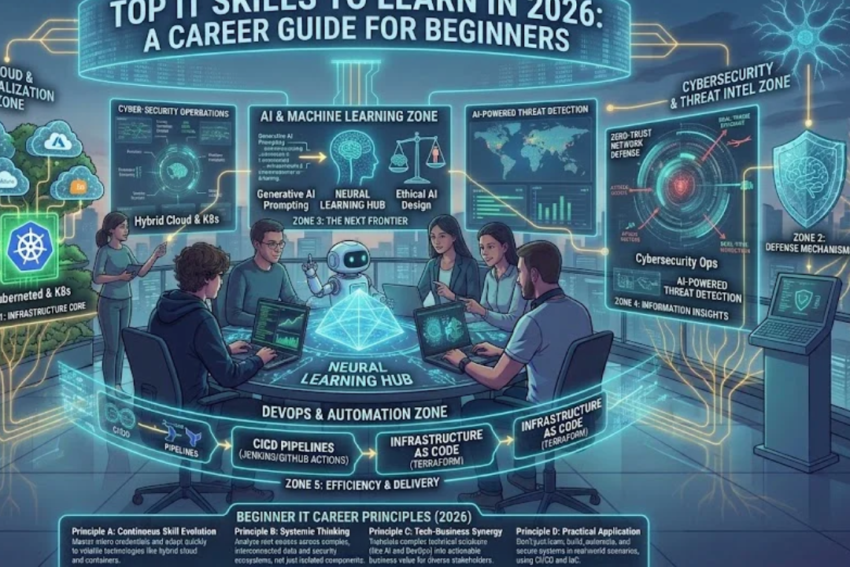
Meta Description: Discover the top IT skills to learn in 2026, including cybersecurity, cloud computing, AI, programming, networking, and data analytics. Start your IT career with this beginner-friendly guide.
Suggested URL Slug: top-it-skills-to-learn-in-2026
Primary Keyword: Top IT skills to learn in 2026
Secondary Keywords: IT skills for beginners, best technology skills, IT career for beginners, high-demand IT skills, learn cybersecurity, cloud computing skills, programming skills, AI skills, IT career roadmap
Introduction
Information technology (IT) continues to influence how businesses operate, how people communicate, and how organizations manage information. From cloud-based applications and artificial intelligence to cybersecurity and data analytics, technology creates opportunities for people who want to develop practical, valuable skills.
If you are a student, recent graduate, job seeker, or professional considering a career change, learning the right IT skills can help you prepare for a wide range of technology-related roles. However, choosing where to start can be confusing. There are hundreds of programming languages, certifications, software tools, and online courses available, and beginners often struggle to identify the skills worth prioritizing.
The good news is that you do not need to learn everything at once. A better approach is to understand basic IT concepts, select a specialization that matches your interests, and build practical experience through projects.
In this guide, we explore the top IT skills to learn in 2026, explain why each skill matters, and provide a practical roadmap to help beginners start their technology careers.
1. Artificial Intelligence and AI Literacy
Artificial intelligence (AI) is becoming part of many everyday technology workflows. Businesses use AI-powered tools to analyze information, assist customers, automate repetitive tasks, generate content, and support software development.
For beginners, learning AI does not necessarily mean building advanced machine-learning models. You can start by understanding how AI systems work, where they are useful, and how to use them responsibly.
What should you learn?
- AI fundamentals: Understand machine learning, natural language processing, generative AI, and common AI applications.
- Prompt writing: Learn how to provide clear instructions, relevant context, and examples to AI tools.
- AI-assisted productivity: Use AI to support research, documentation, coding, and data analysis while checking the results.
- Responsible AI: Understand privacy, bias, accuracy, and the importance of human review.
- Basic Python: If you want to move toward AI development, learn Python and fundamental data-handling techniques.
Career opportunities
AI-related skills can complement roles such as software developer, data analyst, IT support specialist, automation engineer, and machine-learning engineer. Advanced AI roles usually require additional mathematics, programming, and technical knowledge.
Beginner project
Create a simple FAQ assistant using a no-code AI tool or a basic Python application. Test it with different questions, document its limitations, and make sure it does not expose private information.
Best for: Beginners interested in automation, software, productivity tools, and emerging technologies.
2. Cybersecurity
Cybersecurity focuses on protecting computers, networks, applications, and data against unauthorized access, misuse, and digital attacks.
As organizations rely on online services and interconnected systems, security awareness is important across almost every IT role. Cybersecurity is also a potential specialization for people who enjoy investigating problems, identifying risks, and protecting systems.
Essential cybersecurity skills
- Understanding common threats such as phishing, malware, and ransomware.
- Learning authentication, multi-factor authentication, and access control.
- Understanding firewalls, network security, and secure configurations.
- Recognizing vulnerabilities and applying security updates.
- Learning basic security monitoring and incident response.
- Understanding backups, encryption, and data protection.
Beginners should also become familiar with Linux, networking fundamentals, and basic scripting.
Useful tools to explore
Depending on your learning path, you may encounter Wireshark for network analysis, Nmap for authorized network discovery, and security-focused Linux environments for controlled lab exercises.
Use security tools only on systems you own or have explicit permission to test.
Career opportunities
Potential entry-level pathways include IT support with security responsibilities, junior security analyst, security operations center (SOC) analyst, and junior vulnerability management roles. Requirements vary by employer, and some positions expect prior IT experience.
Beginner project
Set up a virtual lab on your own computer. Practice creating secure user accounts, reviewing system logs, configuring a firewall, and documenting the steps you take to improve security.
Best for: People who enjoy problem-solving, investigation, and protecting digital systems.
3. Cloud Computing
Cloud computing allows users and organizations to access computing resources such as servers, storage, databases, and software over a network instead of managing all the underlying infrastructure themselves.
Cloud platforms are widely used to host websites, run business applications, store data, and deploy software. Understanding cloud computing can support careers in IT operations, development, infrastructure, and security.
What should beginners learn?
Start with the basic concepts:
- Cloud computing and traditional on-premises infrastructure.
- Public, private, and hybrid cloud environments.
- Infrastructure as a Service (IaaS), Platform as a Service (PaaS), and Software as a Service (SaaS).
- Virtual machines, storage, networking, and databases.
- Identity and access management.
- Cloud security, monitoring, and cost management.
After learning the fundamentals, choose one major platform, such as Amazon Web Services (AWS), Microsoft Azure, or Google Cloud.
You do not need to learn all three platforms at the beginning. Concentrating on one makes it easier to develop a coherent set of skills.
Career opportunities
Cloud knowledge can support roles such as cloud support associate, junior cloud administrator, cloud operations technician, and cloud engineer. Engineering positions generally require deeper experience with networking, automation, and system administration.
Beginner project
Deploy a simple personal website using a cloud hosting service. Learn how to configure access permissions, monitor usage, and estimate costs. Set spending alerts or use free-tier resources where available to avoid unexpected charges.
Best for: Learners interested in infrastructure, hosting, system administration, and scalable applications.
4. Programming and Software Development
Programming is the process of writing instructions that computers can execute. It is a foundational skill for software development, automation, web applications, and many advanced technology fields.
You do not need to master multiple programming languages to get started. Choose one language based on the type of work you want to do.
Which programming language should you learn?
| Language | Common uses |
|---|---|
| Python | Automation, data analysis, scripting, and AI |
| JavaScript | Interactive websites and web applications |
| Java | Enterprise applications and backend systems |
| C# | Business software, .NET applications, and game development |
| SQL | Querying and managing relational databases |
Python is often a practical starting point for beginners because its syntax is relatively readable and it can be used for several types of projects. JavaScript is a good option if your main goal is web development.
Core programming concepts
Focus on variables, data types, conditions, loops, functions, error handling, and basic data structures. Once you understand these concepts, learn how to read documentation, debug errors, and organize code into reusable components.
Version control is also important. Learn Git and a platform such as GitHub to track changes and share your projects.
Beginner project ideas
- Build a calculator or task-management application.
- Create a personal portfolio website.
- Write a script that organizes files into folders.
- Develop a simple expense tracker.
- Create a basic application that reads and processes a CSV file.
Best for: People who enjoy logical thinking and want to build software, websites, or automated tools.
5. Networking Fundamentals
Computer networking explains how devices communicate and exchange information. Networks support internet access, cloud applications, office systems, video calls, and almost every modern IT service.
Even if you plan to specialize in cybersecurity or cloud computing, networking knowledge will help you understand how systems connect and why connection problems occur.
Important networking concepts
- IP addresses and subnet masks.
- Routers, switches, and wireless access points.
- DNS and DHCP.
- TCP and UDP.
- Ports and common network protocols.
- Firewalls and virtual private networks (VPNs).
- Basic network troubleshooting.
You should also learn how to distinguish between a device problem, a local network issue, and an internet service problem.
Practical tools
Begin with built-in operating system utilities such as ping, ipconfig on Windows, and ip addr on Linux. You can also explore traceroute utilities and Wireshark for examining network traffic.
Career opportunities
Networking can lead toward roles such as IT support technician, network support technician, junior network administrator, and eventually network engineer.
Beginner project
Create a diagram of a small office network showing computers, a router, a switch, wireless devices, and internet connectivity. Explain how each component communicates with the others and write a checklist for troubleshooting connection failures.
Best for: People who enjoy understanding systems, solving connectivity issues, and working with infrastructure.
6. Data Analytics and SQL
Organizations collect information from sales, websites, customer interactions, operations, and many other sources. Data analytics helps transform that information into insights that support decisions.
For beginners, data analytics is an approachable pathway because you can begin with spreadsheets and gradually progress to databases and programming.
Skills to learn
Excel or Google Sheets: Learn formulas, sorting, filtering, charts, pivot tables, and data cleaning.
SQL: Learn how to retrieve information from relational databases using commands such as SELECT, WHERE, GROUP BY, and JOIN.
Data visualization: Explore tools such as Power BI or Tableau to create dashboards and communicate findings.
Basic statistics: Understand averages, percentages, distributions, and the difference between correlation and causation.
Python: Consider learning pandas and basic plotting libraries once you are comfortable with spreadsheets and SQL.
Career opportunities
Relevant roles include junior data analyst, reporting analyst, business intelligence analyst, and operations analyst. Employers may expect a portfolio demonstrating your ability to clean data, answer questions, and explain results.
Beginner project
Use a public dataset to analyze monthly sales, customer preferences, or website traffic. Clean the data, calculate useful metrics, create a dashboard, and write a short summary of your findings.
Best for: People who enjoy working with numbers, finding patterns, and explaining information clearly.
7. Operating Systems and IT Support
IT support helps individuals and organizations resolve technical problems and keep systems working. It is one of the practical entry points into the IT industry, particularly for people who want to build experience before moving into more specialized roles.
Operating-system knowledge is essential because support professionals regularly troubleshoot devices, applications, user accounts, and network connections.
What should you learn?
- Installing and updating Windows or Linux.
- Managing users, groups, files, and permissions.
- Installing and removing applications.
- Understanding drivers and device compatibility.
- Troubleshooting slow computers and application errors.
- Managing backups and basic system recovery.
- Using command-line tools.
- Recording technical issues and explaining solutions to users.
Learn how to troubleshoot systematically instead of trying random fixes. Identify the problem, check the simplest likely causes, test one change at a time, and document the result.
Career opportunities
Possible entry-level roles include help desk technician, IT support specialist, desktop support technician, and technical support representative.
Beginner project
Create a troubleshooting guide covering five common problems, such as slow startup, Wi-Fi connection failures, printer issues, forgotten passwords, and application crashes. For each problem, document the symptoms, possible causes, steps taken, and final solution.
Best for: Beginners seeking hands-on experience and a foundation for later specialization.
8. Database Management
Databases store and organize information so applications can retrieve and update it efficiently. They are used in websites, banking systems, healthcare applications, inventory platforms, and enterprise software.
Database knowledge is useful for software developers, data analysts, application support specialists, and database administrators.
Core database skills
- Understanding tables, rows, columns, and relationships.
- Learning primary and foreign keys.
- Writing SQL queries.
- Understanding database normalization.
- Creating tables and defining data types.
- Learning backups and recovery basics.
- Understanding database permissions and security.
Start with a relational database such as PostgreSQL, MySQL, or SQLite. SQLite is particularly convenient for small beginner projects because it can run without setting up a separate database server.
Beginner project
Design a database for a small library, inventory system, or appointment-booking application. Create tables, insert sample records, and write queries to retrieve useful information.
Best for: Learners interested in backend development, data analysis, and information management.
9. Web Development
Web development involves building and maintaining websites and web applications. It combines programming, design principles, accessibility, and an understanding of how browsers and servers communicate.
It can be a useful learning path because projects are easy to demonstrate through a portfolio.
Frontend development
Frontend development focuses on what users see and interact with.
Learn:
- HTML for page structure.
- CSS for layout and visual presentation.
- JavaScript for interactivity.
- Responsive design for different screen sizes.
- Accessibility and basic user experience principles.
After learning the fundamentals, you can explore frameworks such as React if they suit your goals.
Backend development
Backend development handles application logic, databases, authentication, and communication between systems.
Learn a backend language or runtime, understand HTTP and APIs, and practice connecting an application to a database.
You do not need to learn frontend and backend development simultaneously. Begin with one area, complete a project, and expand gradually.
Beginner project
Build a responsive personal portfolio website with an introduction, skills, project descriptions, and contact information. Publish it online and use it to demonstrate your progress to potential employers.
Best for: Creative and technical learners who want to build visible, interactive products.
10. Communication, Documentation, and Problem-Solving
Technical ability is important, but it is not the only factor that helps someone succeed in IT. Professionals often need to explain complicated problems to nontechnical users, collaborate with colleagues, and document work so others can understand it.
These transferable skills are useful across technical support, software development, cybersecurity, data analytics, and cloud operations.
Essential professional skills
- Clear communication: Explain technical issues using language appropriate to the audience.
- Troubleshooting: Break complex problems into smaller, testable steps.
- Documentation: Record configurations, errors, fixes, and project decisions.
- Teamwork: Share information, ask useful questions, and accept feedback.
- Time management: Prioritize tasks according to urgency and impact.
- Critical thinking: Verify information instead of accepting every result from a search engine or AI tool.
For example, an IT support specialist should be able to explain why a connection failed, what was done to fix it, and whether the issue could happen again.
How to practice
Write a short README file for every project. Describe its purpose, installation steps, tools used, and known limitations. Practice explaining each project in two minutes without relying on technical jargon.
Best for: Everyone pursuing an IT career. These skills strengthen almost every technical specialization.
Which IT Skills Should You Learn First?
You do not need to study all ten areas at once. The best starting point depends on the work you want to do.
| Career goal | Recommended starting skills |
|---|---|
| IT support | Operating systems, networking, troubleshooting, communication |
| Cybersecurity | Networking, Linux, operating systems, security fundamentals |
| Cloud computing | Networking, Linux or Windows administration, cloud fundamentals |
| Software development | Python or JavaScript, programming fundamentals, Git |
| Data analytics | Excel, SQL, statistics, Power BI or Tableau |
| Web development | HTML, CSS, JavaScript, Git |
| AI development | Python, mathematics, data handling, machine-learning fundamentals |
| Database roles | SQL, relational database concepts, backup and access management |
If you are unsure which path to choose, start with basic computer knowledge, networking, operating systems, and simple scripting. These foundations will help you explore several specializations before committing to one.
A Six-Month IT Learning Roadmap for Beginners
A structured plan can help you turn your interest in technology into practical progress. The following roadmap assumes approximately 5–10 hours of study each week. Adjust the pace according to your schedule and starting knowledge.
Month 1: Build your IT foundation
Learn basic computer hardware, operating systems, files, applications, networking concepts, and common troubleshooting methods.
Goal: Understand how computers and networks work.
Month 2: Explore programming and command-line tools
Choose Python or JavaScript and practice variables, conditions, loops, functions, and error handling. Learn basic terminal commands and start using Git.
Goal: Write small programs and track your code changes.
Month 3: Choose a specialization
Select one primary direction: cybersecurity, cloud computing, data analytics, web development, or IT support.
Follow a structured beginner course and focus on the fundamentals rather than collecting many certificates.
Goal: Understand the core tools and concepts in your chosen field.
Month 4: Build your first substantial project
Apply your new knowledge to a practical task. Examples include a small website, a data dashboard, a cloud-hosted page, or a documented troubleshooting lab.
Goal: Create something you can demonstrate to another person.
Month 5: Improve your project and learn professional tools
Use GitHub or another suitable platform to organize your work. Improve documentation, test your project, address errors, and learn the tools commonly used in your chosen area.
Goal: Demonstrate that you can apply your knowledge, not just describe it.
Month 6: Prepare for entry-level opportunities
Create a clear CV, update your professional profile, organize your portfolio, and practice technical interview questions. Apply for internships, trainee roles, junior positions, or relevant support jobs.
Goal: Begin applying for opportunities while continuing to learn.
Remember that six months is a starting framework, not a guarantee of employment. Progress depends on your prior experience, study time, project quality, and the requirements of the roles you pursue.
Do You Need IT Certifications in 2026?
Certifications can help structure learning and demonstrate familiarity with specific technologies. However, they do not automatically guarantee employment, and their value depends on the role, employer, and local job market.
Examples of certification pathways include:
- IT support: CompTIA A+ and relevant Microsoft fundamentals learning paths.
- Networking: Cisco’s CCNA pathway or introductory networking courses.
- Cybersecurity: CompTIA Security+ for learners who have built the necessary foundations.
- Cloud computing: Entry-level learning and certification pathways from AWS, Microsoft Azure, or Google Cloud.
- Data analytics: Microsoft Power BI learning and certification pathways.
- Project and service management: Introductory IT service management training where relevant to the target role.
Always check the official certification provider’s current exam requirements, costs, syllabus, and renewal policy before enrolling.
For many beginners, a good sequence is to learn the fundamentals, complete a practical project, and then decide whether a certification would strengthen their applications.
How to Build an IT Portfolio Without Professional Experience
You can begin developing evidence of your skills before your first IT job. A portfolio is particularly useful when your work history does not yet demonstrate technical experience.
Consider these steps:
- Choose three small projects. Keep them relevant to the role you want.
- Document your process. Explain the problem, the tools you used, and the steps you followed.
- Show the outcome. Include screenshots, a working demonstration, code, or a dashboard when appropriate.
- Explain what you learned. Mention mistakes, limitations, and how you improved the project.
- Keep information safe. Do not publish passwords, API keys, private records, or confidential employer data.
- Update your work regularly. Improve earlier projects as your knowledge grows.
For example, someone applying for an IT support role could document a troubleshooting lab. A data analyst could publish a dashboard using public data. A beginner web developer could create a responsive portfolio website.
A few complete, well-documented projects are generally more useful than a long list of unfinished tutorials.
Common Mistakes to Avoid When Learning IT
Many beginners lose time by trying to learn too many technologies simultaneously. Avoid these common mistakes:
1. Switching between courses too often. Choose one structured learning resource and finish its core material before moving on.
2. Memorizing without practicing. Apply concepts through exercises and projects rather than relying entirely on videos or notes.
3. Chasing every new trend. AI and cloud technologies are important, but strong fundamentals remain useful across many roles.
4. Collecting certificates without building skills. Use certificates to support learning, not as a replacement for practical experience.
5. Ignoring communication skills. Technical work often requires writing reports, documenting changes, and explaining problems.
6. Expecting immediate results. Learning takes time, and entry-level opportunities can be competitive. Set achievable weekly goals and review your progress.
7. Using AI without checking the results. AI tools can make mistakes or produce insecure code. Verify their output and understand the work you submit.
Frequently Asked Questions (FAQs)
1. What are the top IT skills to learn in 2026?
Useful skills include AI literacy, cybersecurity, cloud computing, programming, networking, data analytics, operating-system administration, database management, web development, and communication. The best choice depends on your interests and career goals.
2. Which IT skill is easiest for beginners?
Basic IT support, spreadsheet-based data analysis, and introductory web development can be approachable starting points. The easiest option depends on your existing knowledge and preferred way of learning.
3. Can I learn IT without a computer science degree?
Yes. Many people develop IT skills through self-study, vocational training, certifications, and practical projects. Some employers require specific degrees, but others place substantial weight on demonstrated skills and experience.
4. Can I learn IT skills for free?
Yes. Official documentation, free tutorials, public datasets, coding exercises, and selected free learning platforms can help you begin. Check whether a course, certification exam, or cloud service has additional costs before committing.
5. How long does it take to learn IT?
You can learn basic concepts within weeks or months, depending on your starting point and study schedule. Becoming ready for a specific entry-level role may take longer and usually requires practical experience.
6. Should I learn Python or JavaScript first?
Choose Python if you are interested in automation, scripting, data analysis, or eventually AI development. Choose JavaScript if your primary interest is interactive websites and web applications. Either can teach you important programming fundamentals.
7. Is AI replacing IT jobs?
AI is changing how many IT tasks are performed, including coding assistance, support, analysis, and documentation. Its impact varies by role and organization. Learning to use AI responsibly while developing strong technical and problem-solving skills can help you adapt.
8. Are IT certifications enough to get a job?
Not necessarily. Certifications can demonstrate knowledge, but employers may also assess practical skills, communication, troubleshooting, projects, and previous experience. Combining structured learning with hands-on work is a stronger approach.
9. Which IT skill should I learn for remote work?
Software development, data analytics, cloud-related work, cybersecurity, and some technical support roles can offer remote opportunities. Availability depends on the employer, your experience, the role’s responsibilities, and competition for positions.
10. What is the best way to start an IT career in Pakistan?
Begin by selecting a suitable specialization, learning its fundamentals, completing practical projects, and preparing a focused CV. Explore internships, trainee opportunities, junior roles, and reputable remote-work platforms. Check each employer’s requirements rather than assuming every position is available to beginners.
Conclusion
Learning the right IT skills in 2026 can help you prepare for opportunities across a wide range of technical careers. Artificial intelligence, cybersecurity, cloud computing, programming, networking, and data analytics are valuable areas to explore, but no single skill is the best choice for everyone.
Start with the fundamentals, select a career direction, and dedicate time to practical projects. Build a portfolio that demonstrates what you can do, strengthen your communication skills, and use certifications strategically when they support your goals.
Most importantly, focus on consistent progress rather than trying to master every technology at once. A clear learning plan and evidence of practical ability can help you move from beginner-level knowledge toward your first IT opportunity.
Ready to begin? Choose one skill from this guide, set a realistic weekly schedule, and complete your first practical project. Every finished project gives you another opportunity to learn, improve, and demonstrate your abilities.
Recommended SEO Settings for Jobztit
- SEO title: Top IT Skills to Learn in 2026: Beginner’s Career Guide
- URL slug:
top-it-skills-to-learn-in-2026 - Meta description: Discover the top IT skills to learn in 2026, including cybersecurity, cloud computing, AI, programming, networking, and data analytics. Start your IT career with this beginner-friendly guide.
- Primary keyword: Top IT skills to learn in 2026
- Suggested category: Information Technology
- Suggested tags: IT Skills, Technology Careers, Cybersecurity, Cloud Computing, Artificial Intelligence, Programming, Data Analytics, IT for Beginners
Suggested internal links
Add contextual links to related Jobztit articles:
- What Is Information Technology? A Complete Beginner’s Guide to IT in 2026 — link from the introduction or IT fundamentals section.
- Cloud Computing Explained: Types, Benefits, and How It Works in 2026 — link from the cloud computing section.
- Artificial Intelligence in Information Technology: Applications, Benefits, and Future Trends — link from the AI section.
- IT Support and Troubleshooting: A Complete Guide for Beginners — link from the IT support section.
Use descriptive anchor text and verify each internal link points to the published article’s actual URL.
Suggested featured image
A clean, professional technology-themed image showing a beginner learning IT at a computer, with subtle visual elements representing cloud computing, cybersecurity, programming, AI, and data analytics.
Suggested image alt text: Top IT skills to learn in 2026 for beginners starting a technology career.