Introduction
Imagine receiving an email that appears to come from your bank. It warns that your account will be blocked within the next 24 hours unless you verify your identity. The message looks professional, includes the bank’s logo, and provides a link to what appears to be an official website. Worried about losing access to your money, you click the link and enter your login details.
Unfortunately, the website is fake. Within minutes, a cybercriminal may have your username, password, and other sensitive information.
This is an example of a phishing attack, one of the most common and effective methods used by cybercriminals to steal information and gain unauthorized access to digital accounts.
Phishing has become a significant cybersecurity concern because it targets human behavior rather than relying exclusively on technical weaknesses. Attackers exploit emotions such as fear, curiosity, urgency, and trust to persuade people to take actions that put their information at risk.
In 2026, phishing techniques continue to evolve alongside artificial intelligence, social media, mobile applications, and digital payment systems. Fraudulent messages can appear more convincing than ever, and attackers may impersonate banks, employers, government agencies, delivery services, or even family members.
However, understanding how phishing works can make it much easier to recognize and prevent these attacks.
This article explains phishing attacks, their different forms, the techniques cybercriminals use, warning signs to watch for, and practical strategies individuals and organizations can use to protect themselves.
1. What Is a Phishing Attack?
Phishing is a type of social engineering attack in which a criminal impersonates a trusted person or organization to manipulate a victim into revealing confidential information, clicking a malicious link, opening a harmful attachment, or approving an unauthorized action.
The stolen information may include:
- Email addresses and passwords.
- Online banking credentials.
- Credit or debit card information.
- One-time passwords and authentication codes.
- Personal identification details.
- Business documents and confidential records.
- Access to company networks and cloud accounts.
The ultimate objective depends on the attack. Some criminals want direct financial gain, while others seek information that can be sold, used for identity theft, or exploited in further attacks.
Unlike certain technical attacks that directly exploit a software vulnerability, phishing frequently succeeds because a person is persuaded to perform an action voluntarily.
For example, an attacker may not need to break into an email account if the account owner can be tricked into entering their password on a fraudulent website.
This is what makes phishing particularly dangerous: it combines technological deception with psychological manipulation.
2. How Does a Phishing Attack Work?
Although phishing attacks vary, many follow a similar sequence.
Step 1: Selecting a target
The attacker chooses an individual, organization, or group of people.
Sometimes the target is selected randomly. In other cases, criminals research their victims using public websites, social media profiles, company directories, or previously exposed information.
For example, a criminal targeting university students might imitate a university’s student portal or financial aid department.
Step 2: Creating a convincing message
The attacker prepares a fraudulent email, text message, social media message, phone call, or website.
The message often imitates a trusted organization and gives the victim a reason to respond.
Common examples include:
- Your bank account requires verification.
- Your package could not be delivered.
- Your email storage is full.
- Your account has been temporarily suspended.
- Your employer needs you to review a document.
- You have won a prize.
The message may contain a link, attachment, QR code, or request for confidential information.
Step 3: Triggering an emotional response
Attackers often try to make victims act before thinking carefully.
Fear, urgency, curiosity, and excitement are common psychological triggers.
A warning about account suspension may create fear. A message about an unexpected payment may create curiosity. A claim that someone has won a prize may create excitement.
The purpose is to reduce the time available for careful verification.
Step 4: Directing the victim to a fraudulent destination
The victim may be taken to a fake website that resembles a legitimate service. Alternatively, the message may contain a malicious attachment or ask the victim to approve an action.
A fraudulent website might copy the appearance of a bank’s login page, including its colors, logo, and layout.
However, the website may send entered information directly to the attacker.
Step 5: Stealing information or gaining access
If the victim submits their credentials, downloads malware, or approves an unauthorized request, the attacker may gain access to sensitive information or systems.
In some cases, stolen passwords are tested against other services, particularly when people reuse credentials.
Step 6: Exploiting the compromised account
After gaining access, the attacker might change account recovery settings, steal personal information, send fraudulent messages, request money from contacts, or access confidential documents.
A compromised email account can be especially valuable because email is often used to reset passwords for other accounts.
Understanding this process helps explain why prevention must happen at multiple stages. Recognizing suspicious messages is important, but strong authentication, unique passwords, and account monitoring provide additional protection.
3. Major Types of Phishing Attacks
Phishing is not limited to email. Criminals use multiple communication channels and adapt their methods to different victims.
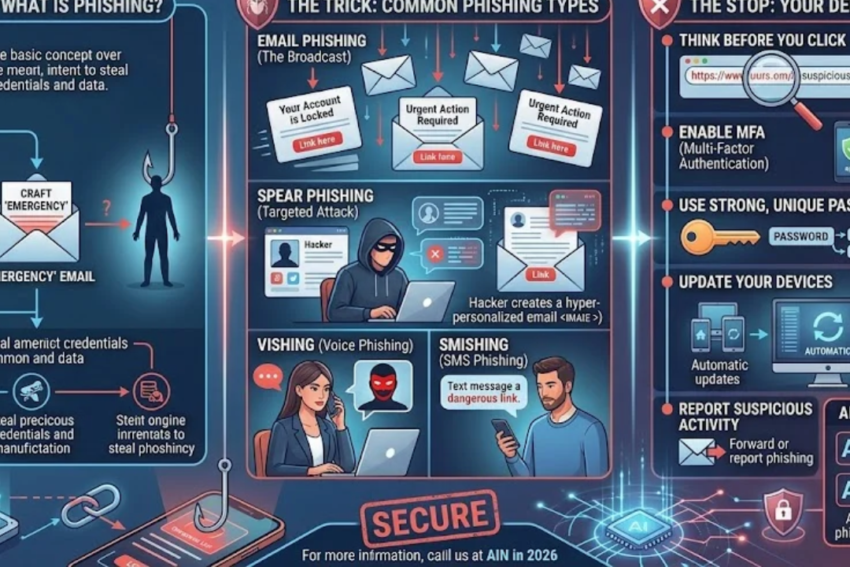
3.1 Email phishing
Email phishing is one of the best-known forms of phishing.
Attackers send messages that appear to come from legitimate organizations, hoping recipients will click links, open attachments, or disclose sensitive information.
For example, an email might claim that a subscription payment failed and ask the recipient to update their payment details.
The message may use a familiar brand name and professional design to appear trustworthy.
How to stay safe: Verify unexpected requests through the organization’s official application or website. Avoid opening unexpected attachments, and do not enter credentials after following suspicious links.
3.2 Spear phishing
Spear phishing is a targeted attack designed for a particular individual or organization.
Instead of sending an identical message to thousands of recipients, the attacker uses information about the intended victim to make the message more believable.
For example, an employee may receive a message referring to a real project, colleague, or upcoming meeting.
Because the message contains familiar details, the recipient may assume that it is genuine.
Attackers may gather this information from public professional profiles, company websites, social media, or previously compromised accounts.
How to stay safe: Treat unexpected requests involving confidential documents, money, credentials, or account access with caution—even when the sender appears to know personal or professional details about you.
3.3 Whaling
Whaling is a form of targeted phishing that focuses on senior executives or other high-value individuals.
Executives may have access to financial approvals, sensitive business information, or important organizational systems.
A fraudulent message might impersonate a lawyer, board member, business partner, or senior employee and request a confidential document or urgent payment.
How to stay safe: Organizations should establish independent verification procedures for financial transfers, sensitive disclosures, and unusual executive requests.
3.4 Smishing: SMS phishing
Smishing uses text messages to deceive victims.
A message may claim to come from a bank, delivery service, mobile operator, or government department. It may warn about a suspicious transaction, unpaid fee, or account problem.
For example, a recipient might receive a text claiming that a parcel cannot be delivered until a small charge is paid through an included link.
The small amount requested may appear harmless, but the website could collect payment details or other personal information.
How to stay safe: Do not use links in unexpected messages to access accounts or make payments. Open the official application or contact the organization through a verified channel.
3.5 Vishing: Voice phishing
Vishing involves fraudulent phone calls or voice messages.
An attacker may impersonate bank staff, technical support, government officials, or a company representative.
The caller might claim that an account has been compromised and ask the victim to disclose a password, verification code, or financial information.
Voice cloning can also make some scams more convincing by imitating a familiar person’s voice.
How to stay safe: Do not reveal passwords or authentication codes to unexpected callers. End the call and contact the organization using a trusted phone number. For unusual requests from family members or colleagues, verify the request through a separate communication channel.
3.6 Clone phishing
In clone phishing, an attacker copies a legitimate message or notification and replaces a genuine link or attachment with a malicious one.
The victim may recognize the original message or believe that the new version is simply a replacement or update.
For example, a fraudulent message might imitate a document-sharing notification that the recipient has previously received from a real service.
How to stay safe: Verify unexpected duplicate notifications and replacement attachments, particularly if they ask you to sign in again or download a file you were not expecting.
3.7 Pharming
Pharming involves redirecting users to fraudulent websites, sometimes by manipulating DNS settings, a compromised router, or other parts of the system used to locate websites.
Unlike many phishing attacks, which depend on a user clicking a deceptive link, some pharming techniques can redirect a person who attempts to visit a legitimate address.
How to stay safe: Keep devices and routers updated, use trusted DNS and security protections, and pay attention to browser security warnings. For sensitive accounts, use official applications or trusted bookmarks where appropriate.
3.8 QR-code phishing
QR-code phishing, sometimes called quishing, uses malicious QR codes to direct victims to fraudulent websites or other unsafe destinations.
A code might appear on a poster, in a message, on a fake parking notice, or in a document.
Because the destination is not immediately visible, a QR code can hide a suspicious URL until it is scanned.
How to stay safe: Scan QR codes only when you trust their source. Check the destination address before opening it, and avoid entering passwords or payment information on unfamiliar pages.
3.9 Business email compromise
Business email compromise (BEC) is a form of fraud in which attackers exploit email accounts, impersonation, or compromised business communications to manipulate organizations into transferring money or disclosing sensitive information.
A criminal might impersonate a supplier and request payment to a different bank account. Alternatively, an attacker may compromise a real employee’s email account and use it to send fraudulent instructions.
BEC can be especially costly because the request may appear to come through an established business relationship.
How to stay safe: Independently verify changes to bank details, unusual payment requests, and confidential transactions. Use established approval procedures rather than relying solely on an email’s apparent sender.
4. How Artificial Intelligence Is Changing Phishing
Artificial intelligence is changing how phishing messages can be created and delivered.
In the past, fraudulent emails sometimes contained obvious spelling mistakes, awkward language, or generic greetings. These clues can still appear, but modern phishing messages may be polished and carefully tailored.
AI tools can help criminals produce fluent text, translate messages into different languages, and adapt communications to particular audiences.
AI can also be misused to create fake audio or video intended to impersonate trusted people.
For example, a worker might receive a voice message that appears to come from a manager requesting an urgent financial transfer. The message may sound familiar, but the identity could be fabricated.
Automated systems can also help attackers process information and generate variations of deceptive messages at scale.
However, AI is not inherently malicious. Cybersecurity teams use AI-assisted tools to identify suspicious messages, detect unusual login activity, and investigate potential attacks.
The important lesson is that traditional warning signs are no longer sufficient on their own.
A message can be grammatically perfect and still be fraudulent. A familiar voice can be imitated. A company logo can be copied.
Verification is more reliable than appearance. When a request involves money, passwords, personal data, or sensitive access, confirm it through a separate, trusted channel.
5. Warning Signs of a Phishing Message
Recognizing suspicious behavior is one of the most effective ways to reduce phishing risk.
Unusual urgency
Messages that demand immediate action may be designed to prevent careful thinking.
Examples include threats of account closure, warnings about imminent penalties, and urgent payment requests.
Legitimate organizations sometimes send time-sensitive notifications, so urgency alone does not prove fraud. It should, however, encourage independent verification.
Suspicious sender addresses
An email display name can be misleading. Check the full sender address and compare its domain with the organization’s genuine domain.
Attackers may use lookalike domains that differ by a small spelling change or an added word.
Even an apparently correct address is not conclusive proof that a message is safe, because legitimate accounts can be compromised or sender details can be manipulated.
Unexpected requests for sensitive information
Be suspicious when an unexpected message asks for passwords, recovery codes, payment details, or other confidential information.
Legitimate support teams should not need you to disclose your password or one-time authentication code to them.
Unexpected links and attachments
A message may direct you to a fake sign-in page or encourage you to open a malicious file.
On a computer, you can often preview a link’s destination without opening it. On a mobile device, use the link-preview feature if available, but do not rely on a preview as a guarantee of safety.
When uncertain, navigate independently to the official service.
Unusual payment instructions
A sudden request to change supplier bank details, pay a new account, or transfer money urgently should be verified using a previously established contact method.
Inconsistent context
A message may appear to come from someone you know but request something that is unusual for that person.
Check whether the request fits the normal relationship, process, and circumstances.
A domain that does not match the claimed organization
A website may use a brand’s name in a longer address without actually belonging to that organization.
For example, a domain containing a brand name followed by unrelated words may be controlled by someone else.
The important part is understanding which domain you are actually visiting, rather than assuming that any appearance of a company name makes a website genuine.
6. Practical Ways to Prevent Phishing Attacks
No single security measure can eliminate phishing, but several layers of protection can substantially reduce the risk.
6.1 Verify messages independently
If you receive a suspicious message from a bank, employer, delivery company, or government agency, do not rely on the contact details or links included in that message.
Instead, use the official application, a previously saved website bookmark, or a verified phone number.
If a colleague asks for confidential information, confirm the request through your normal internal communication system.
6.2 Use unique passwords
Create a different password for each important service.
Password reuse means that a stolen password from one website might unlock other accounts.
A password manager can help generate and store unique credentials without requiring you to memorize every password.
6.3 Enable multifactor authentication
Multifactor authentication provides an additional layer of protection beyond a password.
Where supported, passkeys or hardware security keys offer strong protection against phishing because they are designed to verify the legitimate website or service.
Authenticator applications can also provide useful protection, although codes can still be stolen through certain phishing techniques.
Never approve an authentication request that you did not initiate.
6.4 Keep software updated
Install security updates for your operating system, browser, email application, and other software.
Updates frequently fix vulnerabilities that attackers may exploit.
Enable automatic updates when practical and avoid using unsupported software for sensitive activities.
6.5 Use email security tools
Spam filters and email security systems can identify many suspicious messages, block known malicious links, and quarantine unsafe attachments.
Organizations may benefit from additional protections such as sender authentication technologies, including SPF, DKIM, and DMARC.
These technologies help receiving mail systems assess whether messages are authorized to use a domain and whether certain aspects of the message have been authenticated. They reduce some forms of email spoofing but do not prevent every phishing attack.
6.6 Avoid unnecessary downloads
Do not download files or install applications merely because a message claims they are required to access a document or resolve an account problem.
Verify the source and use official download channels.
Be particularly careful with unexpected executable files, macro-enabled documents, browser extensions, and applications that request excessive permissions.
6.7 Protect your personal information
Limit the personal details you publish publicly.
Information about your workplace, family, education, travel plans, and professional responsibilities may help attackers personalize their messages.
Public information does not automatically make someone vulnerable, but it can make targeted impersonation more convincing.
6.8 Report suspicious messages
Use your email provider’s phishing-reporting feature when available.
In a workplace, report suspicious messages to the IT or security team. Do not forward suspected malicious attachments to colleagues unless an approved reporting procedure specifically instructs you to do so.
Reporting helps organizations identify campaigns and warn other potential victims.
7. What Should You Do If You Click a Phishing Link?
Clicking a suspicious link does not always mean that your device or account has been compromised. The risk depends on what happened next.
However, taking prompt action is sensible.
If you clicked but entered no information
Close the suspicious page and do not interact with it further.
If you downloaded a file, opened an attachment, granted permissions, or installed anything, the risk may be greater. Run an appropriate security scan and seek technical assistance if you notice unusual behavior.
If you entered your password
Using a trusted device, change the affected password immediately. If you reused that password elsewhere, change it on those services as well.
Review active sessions, sign out unfamiliar devices, and inspect recovery details for unauthorized changes.
If the compromised account is your primary email, secure it promptly because it may be used to reset passwords on other accounts.
If you entered a one-time code
Contact the affected service through an official channel and review the account for unauthorized activity.
Change the password if appropriate, revoke suspicious sessions, and review authentication methods.
A stolen code may have enabled an attacker to complete a login or approve a transaction.
If you provided financial information
Contact your bank or payment provider immediately using its official phone number or application.
Explain what happened, ask about blocking or replacing affected cards where necessary, and review recent transactions.
If you installed suspicious software
Disconnect the device from networks if active compromise is suspected and doing so is appropriate. Avoid using it to access sensitive accounts until it has been assessed.
For work devices, contact the organization’s IT or security team. Avoid deleting files or reinstalling software before the security team can determine whether evidence needs to be preserved.
If you shared identity information
Monitor relevant accounts and financial activity. Contact the affected institutions and follow their procedures for reporting potential identity theft.
Keep records of suspicious communications and actions you took, since these may be useful when reporting the incident.
8. How Organizations Can Defend Against Phishing
Businesses need more than employee awareness alone. Effective phishing defense combines people, processes, and technical controls.
Employee education
Provide regular, practical training that explains how phishing works and how employees should report suspicious messages.
Training should cover email, text messages, phone calls, QR codes, and impersonation attempts.
A positive reporting culture is important. Employees should be encouraged to report mistakes promptly rather than hide them out of embarrassment.
Multifactor authentication
Require MFA for important accounts, especially email, remote access, administrative tools, and cloud services.
Prefer phishing-resistant methods for high-risk accounts wherever practical.
Least-privilege access
Employees should have only the permissions necessary for their roles.
Limiting administrative access can reduce the damage caused by a compromised account.
Email authentication and filtering
Configure suitable email authentication policies and deploy filtering tools that detect suspicious content, attachments, and links.
Organizations should also protect their own domains against unauthorized use and monitor reports of impersonation.
Payment verification procedures
Require independent confirmation for changes to supplier banking details, urgent transfers, and unusual financial instructions.
Verification should use a trusted channel that is separate from the original request.
Incident response
Establish a clear process for reporting phishing, disabling compromised accounts, revoking sessions, investigating suspicious activity, and notifying affected parties when necessary.
Run exercises to ensure that employees know what to do when an incident occurs.
Continuous monitoring
Monitor authentication events and account activity for suspicious patterns, such as unusual login locations, unexpected forwarding rules, unfamiliar devices, or abnormal access to sensitive files.
Monitoring should be proportionate, lawful, and consistent with organizational privacy policies.
9. Phishing and Cybersecurity Careers
Phishing defense is an important part of the broader cybersecurity industry.
Professionals in security operations, threat intelligence, incident response, digital forensics, and security awareness may investigate phishing campaigns and help organizations prevent future attacks.
Beginners interested in this field can start by learning:
- Basic networking and internet protocols.
- Email systems and domain authentication.
- Common social engineering techniques.
- Identity management and multifactor authentication.
- Security monitoring and incident response.
- Safe analysis of suspicious messages and files.
Practical learning should take place in authorized training environments or on systems for which the learner has explicit permission.
Understanding phishing also helps professionals outside traditional IT roles. Finance teams, healthcare workers, administrators, teachers, and customer-support employees may all handle sensitive information that attackers want to obtain.
Cybersecurity awareness is therefore a useful professional skill across many industries.
10. The Future of Phishing Prevention
Phishing prevention will continue to evolve as attackers develop new techniques and organizations adopt stronger authentication systems.
Passkeys and other phishing-resistant authentication methods can reduce the value of stolen passwords. Better email filtering can help identify suspicious messages before they reach users. AI-assisted security tools may improve the detection of unusual activity and help analysts respond more quickly.
However, technical controls alone will not solve every problem.
Attackers can exploit legitimate communication channels, compromised accounts, and trusted business relationships. They can also target people through phone calls, social media, messaging applications, and in-person interactions.
The future of phishing prevention will therefore depend on multiple layers of defense:
- Strong authentication.
- Secure account recovery.
- Reliable verification procedures.
- Effective security monitoring.
- Regular software updates.
- Practical user education.
- Prompt reporting and incident response.
As digital communication becomes more sophisticated, the ability to verify identity and context will become increasingly important.
Conclusion
Phishing attacks remain a serious cybersecurity threat because they exploit one of the most fundamental elements of digital life: trust.
Cybercriminals imitate familiar organizations, colleagues, and service providers to persuade people to reveal sensitive information or approve unauthorized actions. Their techniques include email phishing, spear phishing, smishing, vishing, QR-code scams, and business email compromise.
Artificial intelligence has introduced additional challenges by making it easier to generate convincing messages and imitate voices. As a result, users should not rely only on spelling errors, suspicious appearances, or unfamiliar communication styles to identify scams.
The most effective response is to develop a habit of verification. Check unexpected requests independently, use unique passwords, enable multifactor authentication, update software, and avoid entering sensitive information through links in unsolicited messages.
Organizations should strengthen these habits with secure authentication, email protections, access controls, employee training, payment verification procedures, and incident response plans.
If a phishing incident occurs, act quickly. Secure affected accounts, contact financial institutions when necessary, preserve relevant evidence, and report the incident through appropriate channels.
Ultimately, preventing phishing is not about distrusting every message. It is about knowing when to pause, how to verify what you receive, and why sensitive actions deserve extra care. These simple principles can protect personal information, reduce financial losses, and make the digital world safer for everyone.